Participant
April 9, 2018
Answered

Having Trouble with Buttons That Link To Webpages

  • April 9, 2018
  • 1 reply
  • 444 views

Hi everyone,

I recently used Adobe Animate to make a moving image for the home page of my website. I run Adobe Animate Version 18.0 (Build 107) on a Windows 8.1 Laptop. Unfortunately, I've run into a few problems after exporting to SWF:

The links for "comics", "illustration", and "design" are not working. Whenever I test the movie in Adobe Animate, the links work just fine. But on my site, the buttons hover and click correctly, but do not carry to the links.

It's important to mention that after completing the swf, I placed it inside of an Adobe Muse document and converted it to wordpress through an FTP client (version 2018.0.0.685, CL 806425). Though, I don't think the error was necessarily caused by Muse -- see below.

Each of these buttons has a version of this code in the Action panel on Frame 1 under Scene 1:

Button code

var _this = this;

/*

Clicking on the specified symbol instance executes a function.

*/

_this.button_3.on('click', function(){

/*

Loads the URL in a new browser window.

*/

window.open('http://www.nutmegnautilus.com/design', '_blank');

});

I am unable to open just the SWF to see if it's an issue when exporting, but I know I get these errors when I publish as a movie. I tried to look up the error codes online, but couldn't find much:
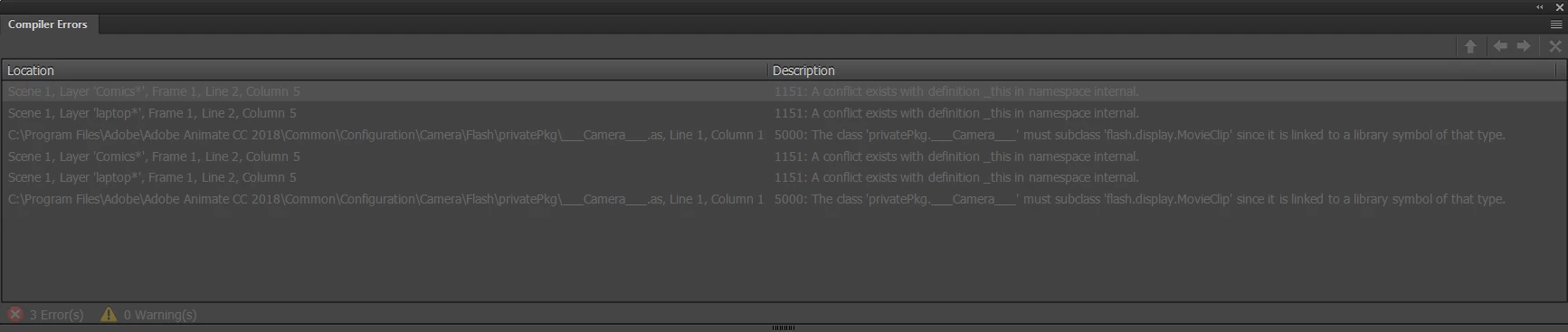
I'm thinking I've put the code in the wrong spot, but I can't be sure as this is my first foray into Adobe Animate. All the links are within my current site, and there's a nav bar above, but it'd be nice to get these flash links working too.

Thank you in advance.

    This topic has been closed for replies.
    Correct answer kglad

    navigateToURL(new URLRequest(('http://www.nutmegnautilus.com/design'), '_blank');

    should be:

    navigateToURL(new URLRequest('http://www.nutmegnautilus.com/design'), '_blank');

    1 reply

    kglad
    Community Expert
    Community Expert
    April 9, 2018

    that's not actionscript.  it's javascript/easeljs.  you would publish an html5/canvas project with that code.

    so either the code is wrong or you discussion of a swf is unrelated to the problem and you just need to upload the graphics etc folders published by your html5/canvas project.

    from the error messages, it looks like you are publishing an as3 project (that may include a swf) and you're failing to use as3 code.  as3 would look like:

    button_3.addEventListener(MouseEvent.CLICK,openF);

    function openF(e:MouseEvent):void{

    navigateToURL(new URLRequest(('http://www.nutmegnautilus.com/design'), '_blank');

    }

    Participant
    April 9, 2018

    Oh, ok, thank you. I don't know much about all the code stuff that goes into Adobe Animate documents.

    I went ahead and put in the code, but when I try to export now, it gives me this error instead. I tried adding a right parenthesis in a few places but it didn't seem to work.

    kglad
    Community Expert
    kgladCommunity ExpertCorrect answer
    Community Expert
    April 9, 2018

    navigateToURL(new URLRequest(('http://www.nutmegnautilus.com/design'), '_blank');

    should be:

    navigateToURL(new URLRequest('http://www.nutmegnautilus.com/design'), '_blank');