


Inspiring
November 23, 2020
Question

headaches with paintbucket, seriously considering switching to another program

  • November 23, 2020
  • 4 replies
  • 413 views

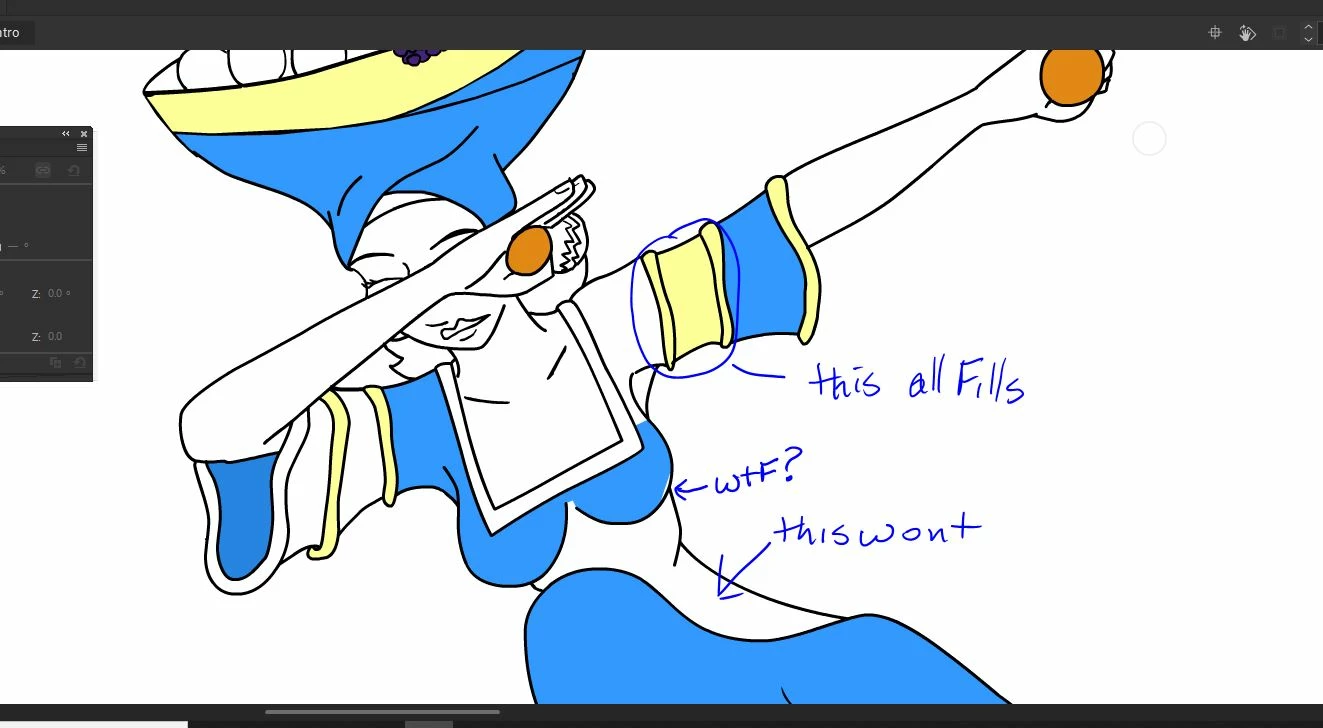
So i've read over several threads detailing problems with the paintbrush, and recently i thought I had fixed my own issue in a thread i posted just the other day. Now it seems that the program is just obeying me when it wants to. Ok, so i've drawn the lines into my frames and now i'm trying to fill them. I HAVE TRIED TURNING OFF OBJECT DRAWING. I HAVE TRIED USING CONTROL +B, I HAVE TRIED CONVERTING LINES TO FILL, I HAVE TRIED SELECTING CLOSE GAPS...and yet nothing seems to work. The painbucket will either flat out refuse to fill an empty space, or will only fill part of it or will fill several spaces outside of it. Why is this so freaking frustraiting? What am i doing wrong and ALSO, whenever i try to use theerase too to erase part of a pencil line it leaves a round tip like it is only erasing anchor points. I am seriously 2 seconds away from dropping my adobe payments 
This topic is closed to new replies. Start a new post to keep the conversation going.

4 replies

joechump
Inspiring
November 24, 2020

When this kind of thing happens to me it's almost always that a number of items are accidentally on different layers, or just one of the lines is an object. Also I usually select the keyframe and hit cmdB (Mac) a number of times to break everythign apart. (I know you've tried this.) It might help to check outlines view on a layer to see too.

Also bear in mind that the way the fill works depends on your zoom level. No joke. It's a quirk of Flash from the early days but once you get used to it its actually quite good. You might find zooming in or out changes what/how something is filled. 

One last thing is the check the lock fill button isnt on but I've never really understood that and I think it only applies to gradients.

RomanpenAuthor
Inspiring
November 24, 2020

The zoom thing actually helped quite a bit, thanks! Still acting wierd with some stuff but i'll just have to go back and figure it out. 

n. tilcheff
Legend
November 23, 2020

Hi mate,


My suggestion is this:

Before filling in with the Paint Bucket, make sure all the linework is broken apart on the same layer.

Then use the bucket with the "Don't close gaps" setting.

If something does not fill properly, go into layer Outline mode and inspect the strokes zooming in. Most likely they are not connected and there is a gap. 

With Object Snapping ON just join the lines by dragging with the Selection Tool.

In rare cases there may be messed up points and then you might want to use the Subselection Tool to see and possibly delete a point or two.


Hope this helps


Nick - Character Designer and Animator, Flash user since 1998 | Member of the Flanimate Power Tools team - extensions for character animation
RomanpenAuthor
Inspiring
November 24, 2020

thanks