

Help autoplay video on nextframe, AS3 Noob
Hi all i'm new to AS3 and i'm making a RNG for a small event i'm going to be hosting. I've run into a small hitch.
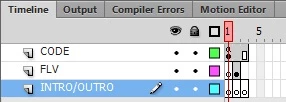
My code dictates that a next frame plays on button click. i had a video 12 seconds long play on my 2nd frame. which would then move to third frame for final display of results after the timer ran its course.
This was not an issue until I tried changing the video because of resolution issues
Now the video refuses to play and remains static on the frame... I cannot for the life of me get it to play anymore. I must have screwed something up when changing the video over... or i just got lucky settign up the first one.
Can i get help to get this video to play on Frame2 on the FLV layer automatically when the frame changes to it?
stop();
import flash.events.MouseEvent;
import flash.media.Video;
var myTimer:Timer = new Timer(12000,0);
contestants.restrict = "0-9";
RNG.visible = false;
//Call Button Click
SubmitContestants.addEventListener(MouseEvent.CLICK, generateRandom);
function generateRandom(event:MouseEvent):void
{
//RNG Generator
var maxcontestant:Number = Number(contestants.text);
var RNGresult:Number = Math.floor(Math.random() * (maxcontestant+1));
//RNG Display
RNG.text = RNGresult.toString();
// Visual removal of uneeded displays
SubmitContestants.visible = false;
SubmitContestants.enabled = false;
contestants.height = 0;
contestants.width = 0;
nextFrame();
//Timer function embedded into button click.
//Set to run after 12 seconds
myTimer.start();
myTimer.addEventListener(TimerEvent.TIMER, timerListener);
function timerListener (e:TimerEvent):void
{
//Display RNG result && Move to static Frame for final display
RNG.visible = true;
nextFrame();
}
}


 AdChoices