
help connecting to a database
I am trying to connect to a database named "login_db"
login_db has 1 table named "accounts"
accounts has 3 fields "id" "name" "pass"
three records were inserted so the database wouldn't be blank.
I am using Flash CC, AS3, PhP, AMFPHP, UwAmp, PhPMyAdmin.
the error i get if i run the swf with ctrl+shift+enter
Attempting to launch and connect to Player using URL L:\UwAmp\www\Databasetest\databasetest.swf
[SWF] L:\UwAmp\www\Databasetest\databasetest.swf - 91944 bytes after decompression
*** Security Sandbox Violation ***
Connection to http://localhost/amfphp/gateway.php halted - not permitted from file:///L|/UwAmp/www/Databasetest/databasetest.swf
-- Untrusted local SWFs may not contact the Internet.
SecurityError: Error #2028: Local-with-filesystem SWF file file:///L|/UwAmp/www/Databasetest/databasetest.swf cannot access Internet URL http://localhost/amfphp/gateway.php.
at flash.net::NetConnection/connect()
at databasetest_fla::MainTimeline/frame1()[databasetest_fla.MainTimeline::frame1:12]
Cannot display source code at this location.
DatabaseAPP.php code
<?php
class DatabaseApp
{
private $connection;
public function __construct()
{
$this->connection = mysql_connect("localhost", "root", "root");
mysql_select_db("login_db", $this->connection);
}
public function create($params)
{
$query = "INSERT INTO login_db (";
$query .= "name, pass";
$query .= ") VALUES (";
$query .= "'{$params[0]}', '{$params[1]}')";
if($result = mysql_query($query, $this->connection))
{
return true;
}
else
{
return false;
}
}
public function read()
{
$query = "SELECT * ";
$query .= "FROM login_db ";
$result_set = mysql_query($query, $this->connection);
if($result_set)
{
$rows = array();
if(mysql_num_rows($result_set) > 0)
{
while($row = mysql_fetch_array($result_set))
{
$rows[] = $row;
}
}
else
{
$rows[0]['id'] = 0;
$rows[0]['name'] = "NoRecords";
$rows[0]['pass'] = "";
}
return $rows;
}
else
{
return false;
}
}
public function update($params)
{
$query = "UPDATE login_db SET ";
$query .= "name = '{$params[1]}', ";
$query .= "pass = '{$params[2]}', ";
$query .= "WHERE id = {$params[0]} ";
$query .= "LIMIT 1 ";
if($result = mysql_query($query, $this->connection))
{
return true;
}
else
{
return false;
}
}
public function delete($id)
{
$query = "DELETE FROM login_db ";
$query .= "WHERE id = {$id} ";
$query .= "LIMIT 1 ";
if($result = mysql_query($query, $this->connection))
{
return true;
}
else
{
return false;
}
}
}
?>
my AS3 code
// ==== IMPORTS ==== //
import flash.net.NetConnection;
import flash.net.Responder;
import fl.data.DataProvider;
// ==== VARIABLES ==== //
var gateway:String = "http://localhost/amfphp/gateway.php";
var connection:NetConnection = new NetConnection;
var newMode:Boolean = false;
var currentRecord:uint = 0;
connection.connect(gateway);
// ==== INITIALIZATION ==== //
read();
save_mc.enabled = false;
delete_mc.enabled = false;
// ==== FUNCTIONS ==== //
function read():void
{
var responder:Responder = new Responder(readResult, onFault);
connection.call("DatabaseApp.read", responder);
}
function switchMode(addNew = false)
{
if(addNew == true)
{
// Delete button cancels
newMode = true;
}
else
{
// Delete button deletes
newMode = false;
}
}
function clearSettings():void
{
id_txt.text = "ID";
name_mc.text = "";
pass_mc.text = "";
currentRecord = 0;
}
// ==== RESPONDER RESULTS ==== //
function readResult(result:Object):void
{
if(result == false)
{
status_txt.text = "Error reading records.";
}
else
{
var dp:DataProvider = new DataProvider();
for(var i:uint = 0; i < result.length; i++)
{
dp.addItem({id: result['id'],
name: result['name'],
pass: result['pass'],
label: result['name'] + " " + result['name'],
data: result['id']});
}
list_mc.dataProvider = dp;
}
}
// ==== RESPONDER FAULTS ==== //
function onFault(fault:Object):void
{
status_txt.text = String(fault.description);
}
gateway.php code
<?php
| define("PRODUCTION_SERVER", false); | |
| //Include things that need to be global, for integrating with other frameworks | |
| include "globals.php"; |
| //Include framework | |
| include "core/amf/app/Gateway.php"; |
| $gateway = new Gateway(); | ||
| //Set where the services classes are loaded from, *with trailing slash* | ||
| //$servicesPath defined in globals.php | ||
| $gateway->setClassPath($servicesPath); | ||
| //Set where class mappings are loaded from (ie: for VOs) | ||
| //$voPath defined in globals.php | ||
| $gateway->setClassMappingsPath($voPath); | ||
| $gateway->setCharsetHandler("utf8_decode", "ISO-8859-1", "ISO-8859-1"); | ||
| //Error types that will be rooted to the NetConnection debugger | ||
| $gateway->setErrorHandling(E_ALL ^ E_NOTICE); | ||
| if(PRODUCTION_SERVER) | ||
| { | ||
| //Disable profiling, remote tracing, and service browser | ||
| $gateway->disableDebug(); | ||
| // Keep the Flash/Flex IDE player from connecting to the gateway. Used for security to stop remote connections. | ||
| $gateway->disableStandalonePlayer(); | ||
| } | ||
| //Enable gzip compression of output if zlib is available, | |
| //beyond a certain byte size threshold | |
| $gateway->enableGzipCompression(25*1024); | |
| //Service now | |
| $gateway->service(); |
?>
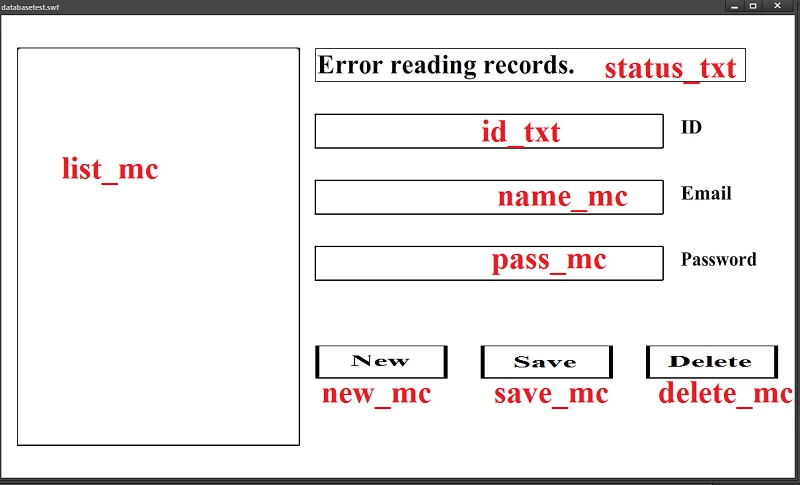
when i run the swf with ctrl+enter all i get is "Error reading records."
the red text is the instance names.


 AdChoices