
skysajedi
Known Participant
July 14, 2017
Answered

HELP! Must Have Pushed a Sequence of keys, cannot see any objects or symbols on the stage

  • July 14, 2017
  • 2 replies
  • 364 views

Hello,

I am new to animate. I have worked in EDGE, but, I do not know what I have done.

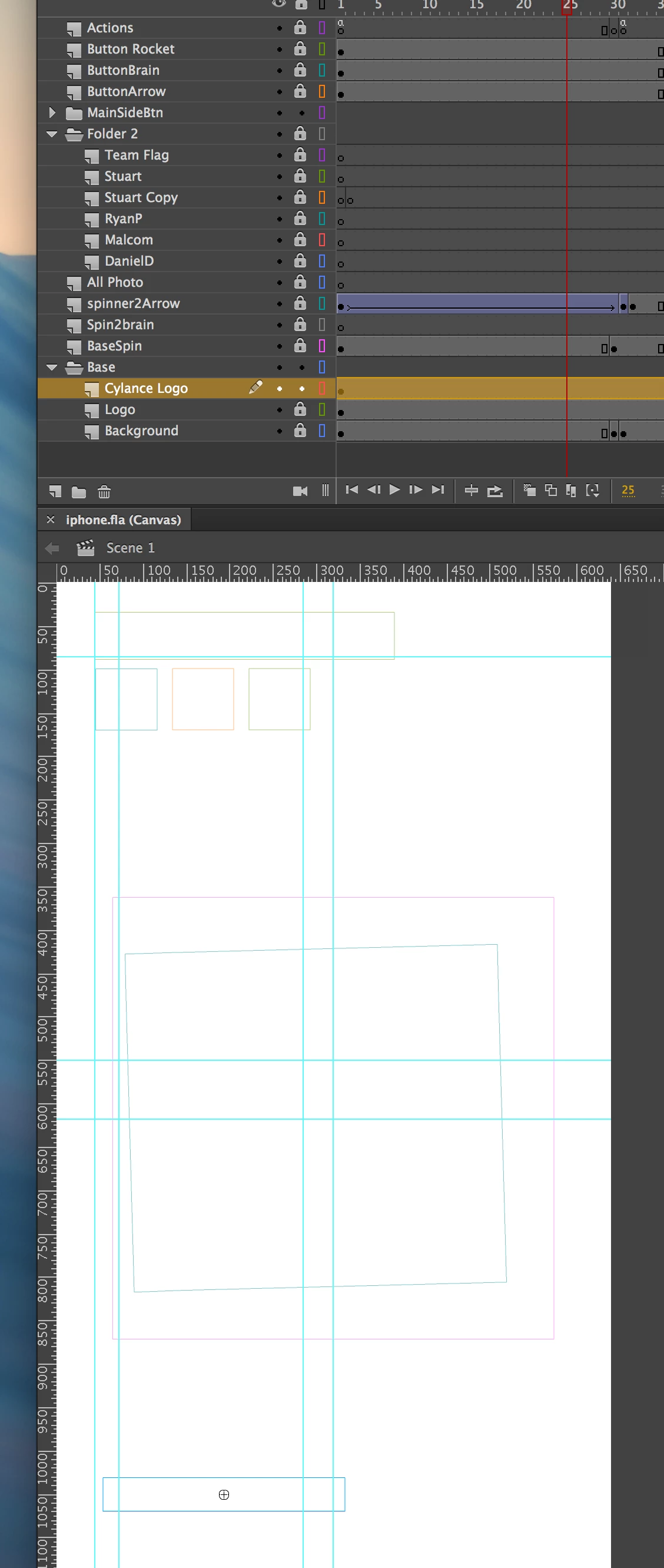
I must have pressed a sequence of keys and cannot see anything on the stage except a white stage and the bounding boxes for the objects and symbols. I have tried a variety of key commands for view, window, modify, and nothing

What have I done?

Please see screen shot.

Thank you, in advance for your help.

Sky

Please help.
    This topic has been closed for replies.
    Correct answer deans67202452

    You have set the layer display to Display Outlines

    Click on the outlined rectangles on the right hand side of each layer (next to the padlock)

    2 replies

    Colin Holgate
    Inspiring
    July 14, 2017

    'deans' is correct about what you've done, but there is another way that can happen, and clicking the outlined rectangle won't fix the other case.

    If you had accidentally type command-option-shift-o, that would have selected the View/Preview Mode/Outlines option. If clicking the outlined rectangle doesn't fix things, check that menu item too.

    Participating Frequently
    July 14, 2017

    'colins' is right as well ;-)

    deans67202452Correct answer
    Participating Frequently
    July 14, 2017

    You have set the layer display to Display Outlines

    Click on the outlined rectangles on the right hand side of each layer (next to the padlock)