Answered
Hi everyone, can you help me?
How can I hide these pixel icons? Afraid, if I clicked on something wrong >
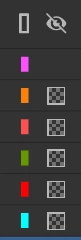

How can I hide these pixel icons? Afraid, if I clicked on something wrong >
Hi, the icons indicate that layer opacity view is enabled. Shift + click the eye icon on top of the layer stack to turn them off.
Already have an account? Login
Enter your E-mail address. We'll send you an e-mail with instructions to reset your password.


 AdChoices