


hiding multiple symbols using class name
I have recently switched from Adobe Edge animate to Adobe animate and looking for a way to hide multiple graphic symbols on different layers at the beginning of the composition and also by button click. But I haven't found any actionscript export or class/base class option in HTML5canvas mode. In Adobe Edge, I used to assign the same CSS class to symbol instances I want to manipulate in a single batch from the properties panel and just use the class name .myclass instead of symbol name to change visibility etc.
I have noticed there's a Linkage column in the Animate's library panel in HTML 5 Canvas mode. If I put the cursor beside the symbol's name there in that column, it allows me to enter some strings. I entered "myclass" for example, but couldn't make it work as a common class.
Here's what I want to do in theory.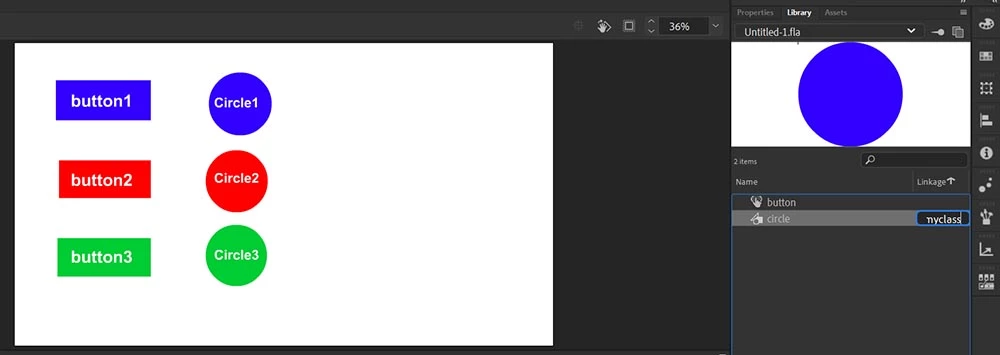
I want to make all circles in the above scenario invisible when I load the webpage. Then if I click on button1, circle1 shows up. If I click button2, circle2 shows up, etc. But, only the current circle should be visible and the corresponding button should be in selected state one at a time. All other circles (if displayed) should be invisible again and the buttons unselected. (I must use Graphic symbols for the circles, not the movieclip symbols, because I need to use the main timeline). For 40+ buttons, it is absurd to put 39 visible = false; statement insie a single mouse click handler and then show the intended one. So what else can I do to achieve the same result?
Use anything like 'Not this' function?
Use getChild() function? (The instances might not be from the same symbol)
Use something like document.getElementByClass("myclass");?
I tired all but failed.
I am not a programmer, so afraid of the concept like arrays. using class would be the easiest thing for me. But how can I assign a css or Javascript class to a Graphic symbol and make all relevant symbols nvisible in HTML 5 canvas mode? I appreciate any help in this regard.
 AdChoices