
KlausKi
Inspiring
December 19, 2023
Question

How can I align objects to a fixed object?

  • December 19, 2023
  • 5 replies
  • 1812 views

I'd like to center align a text symbol to an existing circle symbol.

But whenever I do, the circle symbol moves but not the text symbol:
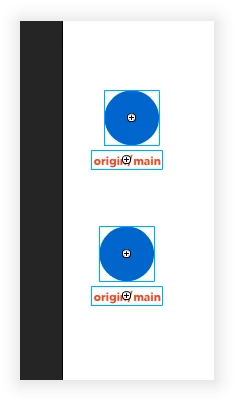
 

How can I designate the text symbol to align to the circle symbol and not vice versa?

5 replies

Firewood:D
Inspiring
November 14, 2024

Hey, I recently used this alignment function. After thinking about it, I wrote an auxiliary script. Put the following code into a file with the suffix name .jsfl and place it in the following path
C:\Users\<user name>\AppData\Roaming\Adobe\Adobe Animate <version number>\en_US(language)\Configuration\Commands\
This way you can use it in the command window.
Alignment.jsfl

var dom = fl.getDocumentDOM();
var selection = dom.selection;
if (selection.length < 2) {
	alert("Please select at least two objects!");
} else {
	// Sort the selected elements from left to right, with the leftmost element as the standard
	selection.sort(function (a, b) {
		return a.left - b.left;
	});
	// Record the x position of the leftmost element
	var leftmostX = selection[0].x;
	dom.align('horizontal center', false);
	// Assign the X position of the leftmost element to other elements
	for (var i = 0; i < selection.length; i++) {
		if (selection[i].x !== undefined) {
			selection[i].x = leftmostX;
		}
	}
}

The script has some usage conditions,
1. The object to be fixed must be ensured to be at the leftmost of all elements, that is, other elements must be to the right of the fixed object,
2. It can only be used for symbols with the registration point in the middle, otherwise it will not work correctly,

KlausKi
KlausKiAuthor
Inspiring
November 14, 2024

Nice!


By chance, there is no property for retrieving the most recently selected object?

Firewood:D
Inspiring
November 15, 2024

I just tried it again. If the operation objects are all groups, they can also be perfectly aligned.
You only need to ensure that the fixed object as a symbol is on the far left and the registration point is centered. The properties of other elements do not have to force the symbol type.
This function needs to be improved, because we can't see what the selected object is after selecting it. It can be used like this for now, and it needs further improvement.
It would be better if someone can add it, so let's solve this problem together.

These are the available states:

Participant
November 8, 2024

I asked ChatGPT how to do this. It replied that I should select the object I didn’t want to move and click the "anchor" button in the Alignment tool tab, then select the other objects and click the desired alignment. Obviously, it made that up—this button doesn’t exist. But it would be a great idea!


kglad
Community Expert
Community Expert
November 9, 2024

it's still easy to align to whatever object you want.  eg, if you want to top and left align object b, c and d to object a, move b,c and d below and to the4 right of a, then select them all and align left and top.

Firewood:D
Inspiring
December 22, 2023

This is a simple but laborious thing, and I’ll share my method.
First you need to determine the reference object, such as the circular symbol you mentioned,
Open the Transform panel and select the circle to enlarge it. In order for other elements to be centered around the circle, the reference object must be wider than the other elements.
Select the text and circle to align them horizontally, then reset the zoom (or return them to their original size).
Now you have a rounded shape with centered text


KlausKi
KlausKiAuthor
Inspiring
December 31, 2023

Very odd … Didn't any user yet complain about this nonesense align feature of Animate?

n. tilcheff
Legend
December 31, 2023

Personally, I don't think that there is anything to complain about. The current implementation is logical, delivers consistent results and is bug free.


I'd be very curious to hear your suggestions how the UX can be improved.


Nick - Character Designer and Animator, Flash user since 1998 | Member of the Flanimate Power Tools team - extensions for character animation
JoãoCésar17023019
Community Expert
Community Expert
December 19, 2023

Hi.


Animate will keep the larger one fixed.


So you have to either enlarge or reduce one of them.


Regards,

JC

KlausKi
KlausKiAuthor
Inspiring
December 19, 2023

Are you sure? In above example (2nd image), both objects moved.

kglad
Community Expert
Community Expert
December 19, 2023

ok.  (i was answering from my phone and am now at my computer.)


select your circle and note its x property, say 100.


select both and center.


select the circle and note its x property, say 158.8, and how much it moved (ie, 58.8)


now select both and note the x property, say 110.55. 


change that to 110.55-58.8 = 51.75


recheck your circle's x property. 


it should be back at 100 and the text should be centered relative to the circle

kglad
Community Expert
Community Expert
December 19, 2023

manually move the text, then align

KlausKi
KlausKiAuthor
Inspiring
December 19, 2023

Where should I move it to? It's already at almost the right place.

kglad
Community Expert
Community Expert
December 19, 2023

move it farther right than you want.