
Inspiring
June 10, 2013
Answered

How can I associate unique information/ variables with different instances of attachMovie when creat

  • June 10, 2013
  • 1 reply
  • 755 views

I'm creating an interactive animation of an experiment, whereby the user has to detect if there is an oil well lying beneath the surface by selecting and drilling a series of coordination points on a map.

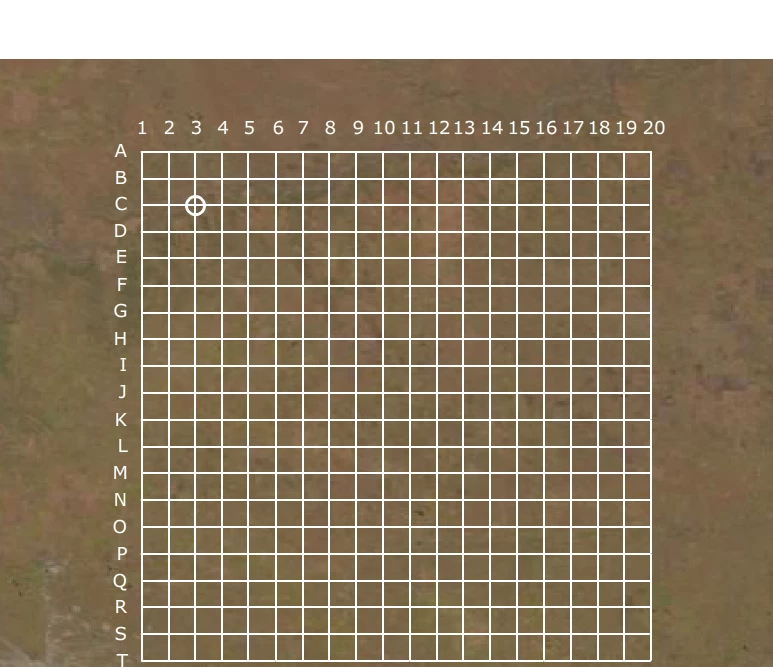
I've done the first stage by setting up a background image containing a grid of 20 x 20 coordinate points, eg columns 1 - 20 and rows A - T. Over the top of this, I've created a dynamic array of clickable objects (open circles) and the centre of each one is  placed over a coordinate point, so when you mouseover a coordinate point, eg C3,  an open circle becomes visible and when you rollout, it becomes invisible again.

However, I'm stuck on the next stage. I need to be able to assign unique variables to one or more clickable objects (open circles). Is it possible to do that? For example:

a)give grid point coordinates to each object (open circle), so for example if someone rolls over the C3 coordinate, the open circle (object) associated with that coordinate, a message will display: "Click on the grid point to drill at C3"

b)assign a variable to one or more objects, so that when an open circle is clicked, the animation associated with that coordination point will be triggered. There will be different animations, depending upon which object (point is clicked)

There are other variables that will need to be setup, but if I know how to assign variables to one or more objects, I can probably figure out the rest.

Here's a copy of my code so far:-

//set up grid for solid array

spacing = 5.75;

cols = 20; // number of columns in grid

rows = 20; // number of rows in grid

leftMargin = 154;

topMargin = 169;

depth = 100; // starting point for depth

for (i=1; i<=rows; i++) {                                                                                                       

for (j=1; j<=cols; j++) {                                                                                                        

current = attachMovie("openCircle_mc", "openCircle_mc"+i+"_"+j, depth++);

current._x = leftMargin + ((i-1) * (spacing + current._width));

current._y = topMargin + ((j-1) * (spacing + current._height));

//open circle initially invisible, visible on rollOver

current._alpha = 0;

current.onRollOver = function() {

           this._alpha = 100;

          }

current.onRollOut = function() {

           this._alpha = 0;

          }

}

}

Below is the background and a rolled over instance of the 'openCircle' object at 'C3'.
I'd very much appreciate some help. Thanks very much.

Pippa

This topic has been closed for replies.
Correct answer kglad

you can assign properties (and methods) to movieclips:

//set up grid for solid array

spacing = 5.75;

cols = 20; // number of columns in grid

rows = 20; // number of rows in grid

leftMargin = 154;

topMargin = 169;

depth = 100; // starting point for depth

for (i=1; i<=rows; i++) {                                                                                                        

for (j=1; j<=cols; j++) {                                                                                                         

current = attachMovie("openCircle_mc", "openCircle_mc"+i+"_"+j, depth++);

current._x = leftMargin + ((i-1) * (spacing + current._width));

current._y = topMargin + ((j-1) * (spacing + current._height));

current.row=i;

current.col=j;

current.oil = Math.floor(Math.random()*1.1);  // about 1/10 objects have oil=1, 9/10 oil=0

//open circle initially invisible, visible on rollOver

current._alpha = 0;

current.onRelease=function(){

trace(this.row+" "+this.col+" "+this.oil);

}

current.onRollOver = function() {

           this._alpha = 100;

          }

current.onRollOut = function() {

           this._alpha = 0;

          }

}

}

1 reply

kglad
Community Expert
kgladCommunity ExpertCorrect answer
Community Expert
June 10, 2013

you can assign properties (and methods) to movieclips:

//set up grid for solid array

spacing = 5.75;

cols = 20; // number of columns in grid

rows = 20; // number of rows in grid

leftMargin = 154;

topMargin = 169;

depth = 100; // starting point for depth

for (i=1; i<=rows; i++) {                                                                                                        

for (j=1; j<=cols; j++) {                                                                                                         

current = attachMovie("openCircle_mc", "openCircle_mc"+i+"_"+j, depth++);

current._x = leftMargin + ((i-1) * (spacing + current._width));

current._y = topMargin + ((j-1) * (spacing + current._height));

current.row=i;

current.col=j;

current.oil = Math.floor(Math.random()*1.1);  // about 1/10 objects have oil=1, 9/10 oil=0

//open circle initially invisible, visible on rollOver

current._alpha = 0;

current.onRelease=function(){

trace(this.row+" "+this.col+" "+this.oil);

}

current.onRollOver = function() {

           this._alpha = 100;

          }

current.onRollOut = function() {

           this._alpha = 0;

          }

}

}

Pippa01Author
Inspiring
June 10, 2013

Thanks very much. I'll have a good look at it in the morning.

kglad
Community Expert
Community Expert
June 10, 2013

you're welcome.