
Known Participant
November 15, 2019
Answered

How can I save my custom workspace in Animate 2020?

  • November 15, 2019
  • 2 replies
  • 5402 views

Hi, Animate Community! I'm an old Flash user and back to make a project in Animate for the first time in a long while. I set up a custom workspace but don't see where I can save it, under Window>Workspaces. I just see an option to RESET to Classic, which is what I based my custom workspace off of. 


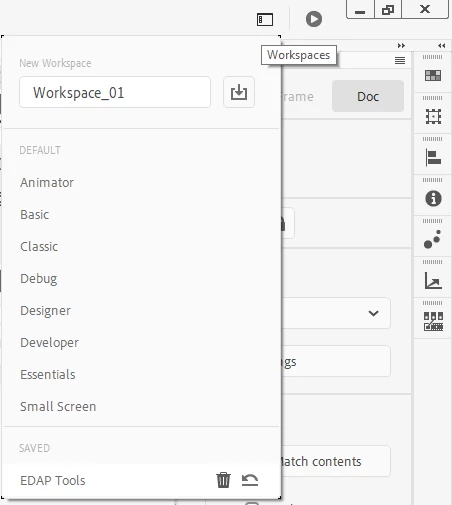
Referencing the internet, I see NEW WORKSPACE is under the menu above but I don't see it on my system. I read online that there is a "workspace switcher" but I can't find it. Is this switcher just the menu, under Window>Workspaces, above?
This topic has been closed for replies.
Correct answer n. tilcheff

Hi mate,


Yeah, in Animate 20 it's a button at the top-right of the application window which will pop a menu/dialog of sort that lets you manage your workspaces.


2 replies

cljffordAuthor
Known Participant
November 15, 2019

I found a Workspace dialogue that lets me save a custom workspace. For me, it's up in the top right corner, on the same row as the home and Mac OSX Finder window controls, next to Test Movie.

n. tilcheff
n. tilcheffCorrect answer
Legend
November 15, 2019

Hi mate,


Yeah, in Animate 20 it's a button at the top-right of the application window which will pop a menu/dialog of sort that lets you manage your workspaces.


Nick - Character Designer and Animator, Flash user since 1998 | Member of the Flanimate Power Tools team - extensions for character animation
cljffordAuthor
Known Participant
November 16, 2019

thanks!

Legend
November 15, 2019

It would be ever so helpful if you'd post which version of Animate you're using.

cljffordAuthor
Known Participant
November 15, 2019

Thanks ClayUUID,

I'm running v 20.0 (build 17400) on a MacBook Pro (15-inch, Late 2016).