Inspiring
February 17, 2017
Answered

How do I center my clock in Animate CC 2017?

  • February 17, 2017
  • 1 reply
  • 1308 views

Hi There,

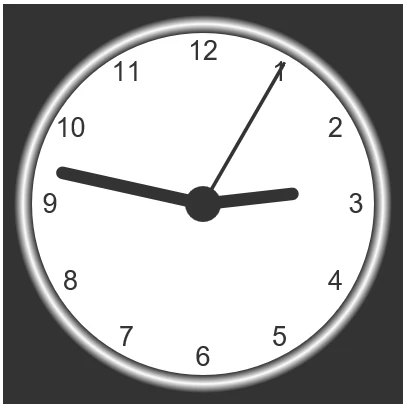
I am trying to rebuild the canvas clock example on W3schools website in animate CC. However when I use the code my clock ends up in the upper left rather than centered on my canvas. Is there a simple way to correct this?

The canvas is 400px with and 400px height. Background #333;

I tried to set most of the radius to 200,200 but this messes up the arms of the clock for some reason. Animate does not let me set the center of the Stage to 0 for the HTML 5 canvas .

This is the code I put into the Actions Panel. Any thoughts?

var canvas = document.getElementById("canvas");
var ctx = canvas.getContext("2d");
var radius = canvas.height / 2;
ctx.translate(radius, radius);
radius = radius * 0.90
//setInterval(drawClock, 1000);--- this cause the clock to flash and stall
setInterval(drawClock);

function drawClock() {
  drawFace(ctx, radius);
  drawNumbers(ctx, radius);
  drawTime(ctx, radius);
}

function drawFace(ctx, radius) {
  var grad;
  ctx.beginPath();
  ctx.arc(0, 0, radius, 0, 2*Math.PI);
  ctx.fillStyle = 'white';
  ctx.fill();
  grad = ctx.createRadialGradient(0,0,radius*0.95, 0,0,radius*1.05);
  grad.addColorStop(0, '#333');
  grad.addColorStop(0.5, 'white');
  grad.addColorStop(1, '#333');
  ctx.strokeStyle = grad;
  ctx.lineWidth = radius*0.1;
  ctx.stroke();
  ctx.beginPath();
  ctx.arc(0, 0, radius*0.1, 0, 2*Math.PI);
  ctx.fillStyle = '#333';
  ctx.fill();
}

function drawNumbers(ctx, radius) {
  var ang;
  var num;
  ctx.font = radius*0.15 + "px arial";
  ctx.textBaseline="middle";
  ctx.textAlign="center";
  for(num = 1; num < 13; num++){
    ang = num * Math.PI / 6;
    ctx.rotate(ang);
    ctx.translate(0, -radius*0.85);
    ctx.rotate(-ang);
    ctx.fillText(num.toString(), 0, 0);
    ctx.rotate(ang);
    ctx.translate(0, radius*0.85);
    ctx.rotate(-ang);
  }
}

function drawTime(ctx, radius){
    var now = new Date();
    var hour = now.getHours();
    var minute = now.getMinutes();
    var second = now.getSeconds();
    //hour
    hour=hour%12;
    hour=(hour*Math.PI/6)+
    (minute*Math.PI/(6*60))+
    (second*Math.PI/(360*60));
    drawHand(ctx, hour, radius*0.5, radius*0.07);
    //minute
    minute=(minute*Math.PI/30)+(second*Math.PI/(30*60));
    drawHand(ctx, minute, radius*0.8, radius*0.07);
    // second
    second=(second*Math.PI/30);
    drawHand(ctx, second, radius*0.9, radius*0.02);
}

function drawHand(ctx, pos, length, width) {
    ctx.beginPath();
    ctx.lineWidth = width;
    ctx.lineCap = "round";
    ctx.moveTo(0,0);
    ctx.rotate(pos);
    ctx.lineTo(0, -length);
    ctx.stroke();
    ctx.rotate(-pos);
}
This topic has been closed for replies.
Correct answer HUnknown1

I tried the first code on the graphics list you showed me and copied it directly into the actions panel to test it. In a new document.

But it did not appear to draw anything. When I went to test.

var g = new createjs.Graphics();

g.setStrokeStyle(1);

g.beginStroke("#000000");

g.beginFill("red");

g.drawCircle(0,0,30);

I could draw most of clock in animate. The area that I want to fix is the location of the arms


Ok so after struggling with the code and making a few modifications I think that I got it to work in Animate.

Below is final code I entered into the actions panel. I realize it probably would work better with the createJS Library, but until I see them or Adobe create a full tutorial for making a working clock, it will have to do. At least now I'm not getting 2 clocks. As mentioned earlier, I would probably draw the face of the clock as a Symbol in Animate. However at least the Numbers and moving arms are in the correct coordinates..

var canvas = document.getElementById("canvas");
var ctx = canvas.getContext("2d");
var radius = canvas.height / 2;
ctx.translate(radius, radius);
radius = radius * 0.90
//setInterval(drawClock, 1000);
setInterval(drawClock);

function drawClock() {
drawFace(ctx, radius);
   drawNumbers(ctx, radius);
drawTime(ctx, radius);
//fixes position
ctx.translate(0,0);
ctx.translate(200,200);

}

function drawFace(ctx, radius) {
  var grad;
  ctx.beginPath();
  //ctx.arc(0, 0, radius, 0, 2*Math.PI);
ctx.arc(200, 200, radius, 0, 2*Math.PI);
  ctx.fillStyle = 'white';
  ctx.fill();
  //grad = ctx.createRadialGradient(0,0,radius*0.95, 0,0,radius*1.05);
grad = ctx.createRadialGradient(200,200,radius*0.95, 200,200,radius*1.05);
  grad.addColorStop(0, '#333');
  grad.addColorStop(0.5, 'white');
  grad.addColorStop(1, '#333');
  ctx.strokeStyle = grad;
  ctx.lineWidth = radius*0.1;
  ctx.stroke();
  ctx.beginPath();
  //ctx.arc(0, 0, radius*0.1, 0, 2*Math.PI);
ctx.arc(200, 200, radius*0.1, 0, 2*Math.PI);
  ctx.fillStyle = '#333';
  ctx.fill();
}

function drawNumbers(ctx, radius) {
  var ang;
  var num;
//fixes position
ctx.translate(0,0);
ctx.translate(200,200)
  ctx.font = radius*0.15 + "px arial";
  ctx.textBaseline="middle";
  ctx.textAlign="center";
  for(num = 1; num < 13; num++){
    ang = num * Math.PI / 6;
    ctx.rotate(ang);
    ctx.translate(0, -radius*0.85);
    ctx.rotate(-ang);
    ctx.fillText(num.toString(), 0, 0);
//ctx.fillText(num.toString(), 200, 200);
    ctx.rotate(ang);
    ctx.translate(0, radius*0.85);
    ctx.rotate(-ang);
  }
}

function drawTime(ctx, radius){
    var now = new Date();
    var hour = now.getHours();
    var minute = now.getMinutes();
    var second = now.getSeconds();
    //hour
    hour=hour%12;
    hour=(hour*Math.PI/6)+
    (minute*Math.PI/(6*60))+
    (second*Math.PI/(360*60));
    drawHand(ctx, hour, radius*0.5, radius*0.07);
    //minute
    minute=(minute*Math.PI/30)+(second*Math.PI/(30*60));
    drawHand(ctx, minute, radius*0.8, radius*0.07);
    // second
    second=(second*Math.PI/30);
    drawHand(ctx, second, radius*0.9, radius*0.02);
}

function drawHand(ctx, pos, length, width) { 

ctx.beginPath();
    ctx.lineWidth = width;
    ctx.lineCap = "round";
    ctx.moveTo(0,0);
    ctx.rotate(pos);
    ctx.lineTo(0,-length);
    ctx.stroke();
    ctx.rotate(-pos);


}

1 reply

Colin Holgate
Inspiring
February 17, 2017

Publish Settings have options for making it be responsive. If you can use those it will save a lot of coding.

HUnknown1Author
Inspiring
February 17, 2017

Yeah I tried center stage in publish settings. However that only centers the canvas itself in the HTML 5 file not the clock itself on inside. Here is a screen shot of what I get when I do that. Only a quarter of the clock.

I just want to know what to change in the code to get the clock to sit in the center of canvas. I tried changing the position to 200,200, but when I do that for the draw hands they it don't function correctly.

Legend
February 18, 2017

Why are you trying to port something into Animate that doesn't use any of Animate's features? Seems like learning all the wrong lessons.