Participant
Jan 6, 2022 9:24 AM UTC
Answered

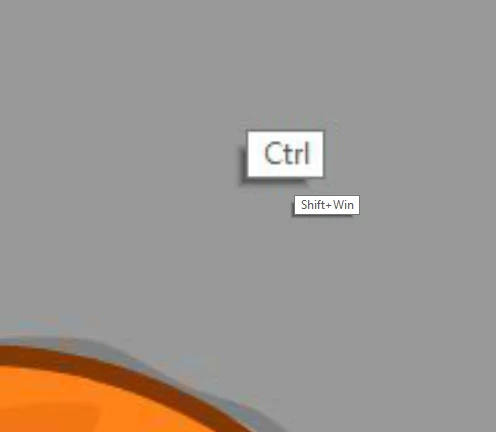
how do I disable the help labels when i'm holding ctrl/shift keys?

    This topic is closed to new replies. Start a new post to keep the conversation going.
    Avishai225127889mjzCorrect answer
    Participant
    Jan 16, 2022 8:26 AM UTC

    Thank you for the reply. somehow it's gone. but since you mentioned Wintab...I work with Wacom Intuos, and since I switched to animate 21, if I want sensitivity and pressure I need to turn on WinInk, but everything else except the pressure advantage is lagging and doesn't function as it should. only when I turn off WinInk again, it goes back to normal. I've searched the web for all the solutions available and nothing seems to fix it. there is a solution when working with Photoshop (making a text file that overrides the WinInk) but there isn't any for Animate...
    working with WinTabe in the Animate settings is all messed up.
    I'm currently working with two monitors and I have no way of controlling the mapping and the general settings of WinTab.
    Do you know any solution around it?

    tnx

    3 replies

    kglad
    Community Expert
    Community Expert
    Jan 6, 2022 3:41 PM UTC

    i've never seen that.  it looks like something specific to your computer.

    Translate
    n. tilcheff
    Legend
    Jan 6, 2022 11:10 PM UTC

    It's specific to Windows Ink, the use of a drawing tablet and possibly some Windows settings.

    I've seen it, but I don't use WinInk, so I don't know how one can get rid of it.

    Switching to WinTab removes the labels.


    Translate
    Nick - Character Designer and Animator, Flash user since 1998 | Member of the Flanimate Power Tools team - extensions for character animation
    Avishai225127889mjzAuthorCorrect answer
    Participant
    Jan 16, 2022 8:26 AM UTC

    Thank you for the reply. somehow it's gone. but since you mentioned Wintab...I work with Wacom Intuos, and since I switched to animate 21, if I want sensitivity and pressure I need to turn on WinInk, but everything else except the pressure advantage is lagging and doesn't function as it should. only when I turn off WinInk again, it goes back to normal. I've searched the web for all the solutions available and nothing seems to fix it. there is a solution when working with Photoshop (making a text file that overrides the WinInk) but there isn't any for Animate...
    working with WinTabe in the Animate settings is all messed up.
    I'm currently working with two monitors and I have no way of controlling the mapping and the general settings of WinTab.
    Do you know any solution around it?

    tnx

    Translate