
How do I embed a button symbol inside of a movie clip symbol?
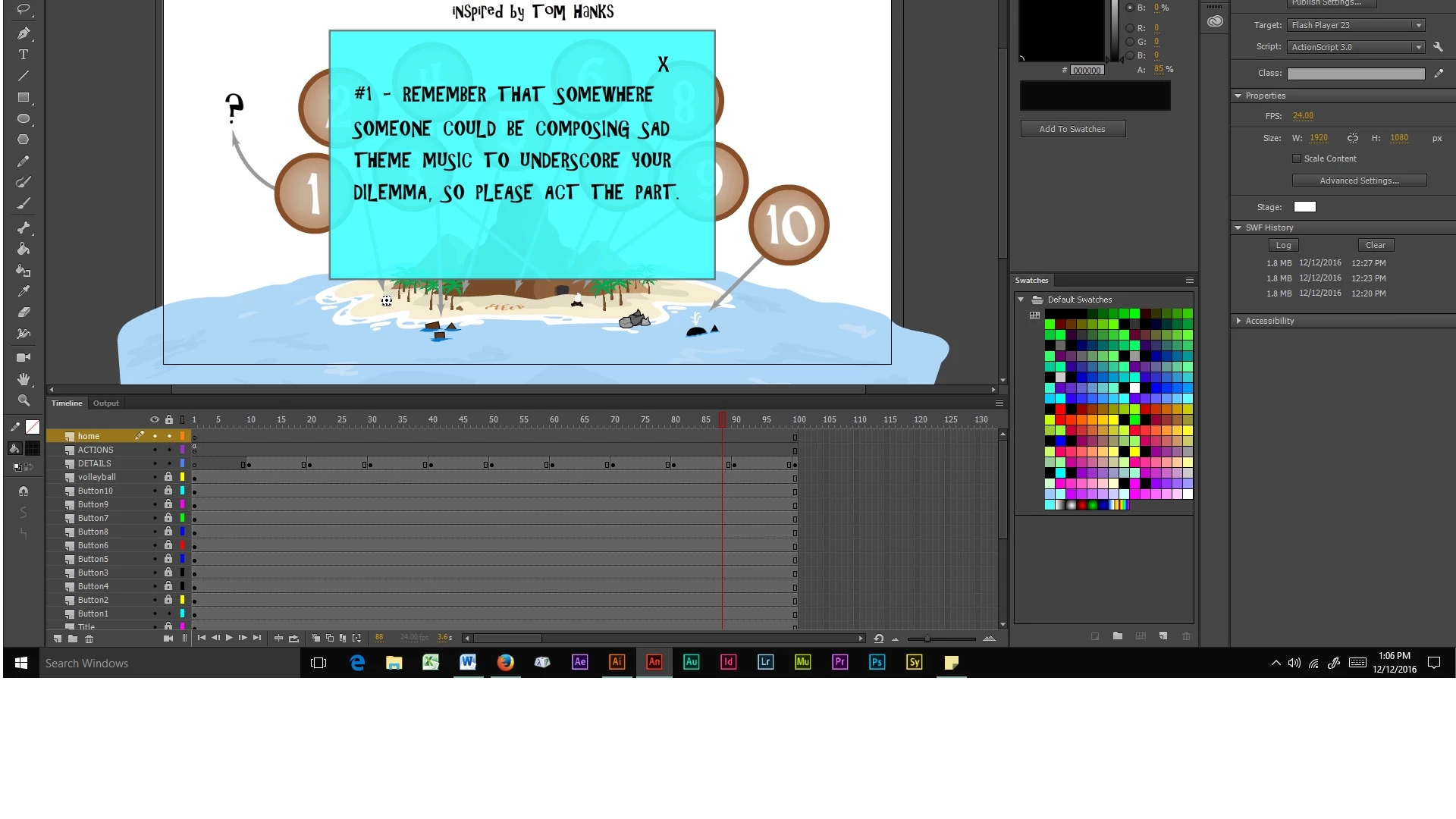
I have 10 buttons on the stage, on their own layers, labelled "BUTTON1" through "BUTTON10". I want each button to open the same rectangle, but with different text inside the rectangle for each button. I have placed the rectangle as a movie clip symbol on its own layer (labelled "DETAILS"). I want to put a "close" or "x" button in the rectangle to close out the rectangle and return to the stage. How do I accomplish this? I created a layer labelled "home", which is the layer I've assigned for the "close" or "x" button. I've received nothing but code errors so far, using this setup. Here are the action script code snippets that I've created so far:
stop();
BUTTON1.addEventListener(MouseEvent.CLICK, fl_ClickToGoToAndStopAtFrame);
function fl_ClickToGoToAndStopAtFrame(event:MouseEvent):void
{
gotoAndStop(10);
}
- home.addEventListener(MouseEvent.CLICK, fl_ClickToGoToAndStopAtFrame_2);
function fl_ClickToGoToAndStopAtFrame_2(event:MouseEvent):void
{
gotoAndStop(0);
}
Here's a screenshot that might help:
 AdChoices