Participant
August 28, 2021
Answered

How do I save a command?

  • August 28, 2021
  • 1 reply
  • 518 views

I want to save a command I use to be here,
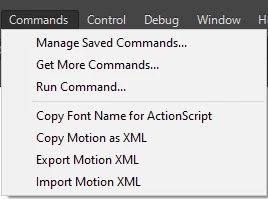
but I dont know how to do it. I see alot of people have their own saved commands there, how can I do it?

    This topic has been closed for replies.
    Correct answer n. tilcheff

    Hi mate,


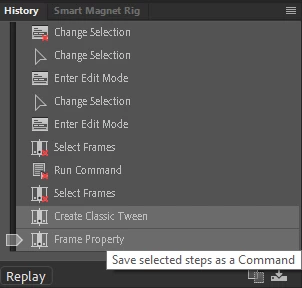
    It's done via the History panel.

    Choose the steps you want to save and click the button at the bottom of the panel.


    If you already have a command that was written by someone else, put it into Configuration\Commands and it will appear in the menu.


    Win: C:\Users\YourUserName\AppData\Local\Adobe\Animate YourVersion\YourLocale\Configuration


    Mac: HD\Users\YourUserName\Library\Application Support\Adobe\Animate YourVersion\YourLocale\Configuration


    1 reply

    n. tilcheff
    n. tilcheffCorrect answer
    Legend
    August 28, 2021

    Hi mate,


    It's done via the History panel.

    Choose the steps you want to save and click the button at the bottom of the panel.


    If you already have a command that was written by someone else, put it into Configuration\Commands and it will appear in the menu.


    Win: C:\Users\YourUserName\AppData\Local\Adobe\Animate YourVersion\YourLocale\Configuration


    Mac: HD\Users\YourUserName\Library\Application Support\Adobe\Animate YourVersion\YourLocale\Configuration


    Nick - Character Designer and Animator, Flash user since 1998 | Member of the Flanimate Power Tools team - extensions for character animation
    crud5ED9Author
    Participant
    August 28, 2021

    thank you