christineavatar
Legend
October 11, 2026
Question

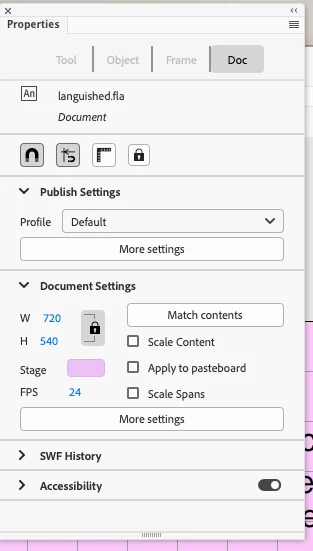
How do you open up Properties when only one of the four options are available

How do you access the other sections? I need to change to Frame to change the sound


    2 replies

    CORCTON34033231
    Community Expert
    Community Expert
    October 16, 2026

    Hi, just following up on JoãoCésar's correct point above — the Properties panel changes with what you have selected, and clicking a layer in the Timeline panel is what brings up the Frame tab. Once that Frame tab is showing, you'll find the Sound settings there for the selected frame. Did that get you to the sound option you needed?


    Translate
    JoãoCésar17023019
    Community Expert
    Community Expert
    October 12, 2026

    Hi.

    It depends on what you have selected.

    Click on a layer in the Timeline panel and you will get the Frame tab.

    Regards,

    JC

    Translate