
Inspiring
July 25, 2023
Question

How to best create input text for Html5 canvas projects

  • July 25, 2023
  • 3 replies
  • 2467 views

Hi team,

So I am trying to create some input text so that a user can enter their name and be referred to by their name.

I have created a class to handle this called texter        (texter.js)

So far I have the class working and talking to a dynamic text box on the stage (instance name texto) making it say "Hello World"

Here is the class code 

class Texter {
  constructor(root) {
    this.root = root;
    this.stage = this.root.stage;
    this.init();
  }

  init() {
    this.root.texto.text = "hello world";
  }
}

Now the issue is that as soon as I add a Textinput component to the stage (not even trying to give it an instance name or code or it or anything) it throws an error in the index.html        Uncaught ReferenceError: $ is not defined
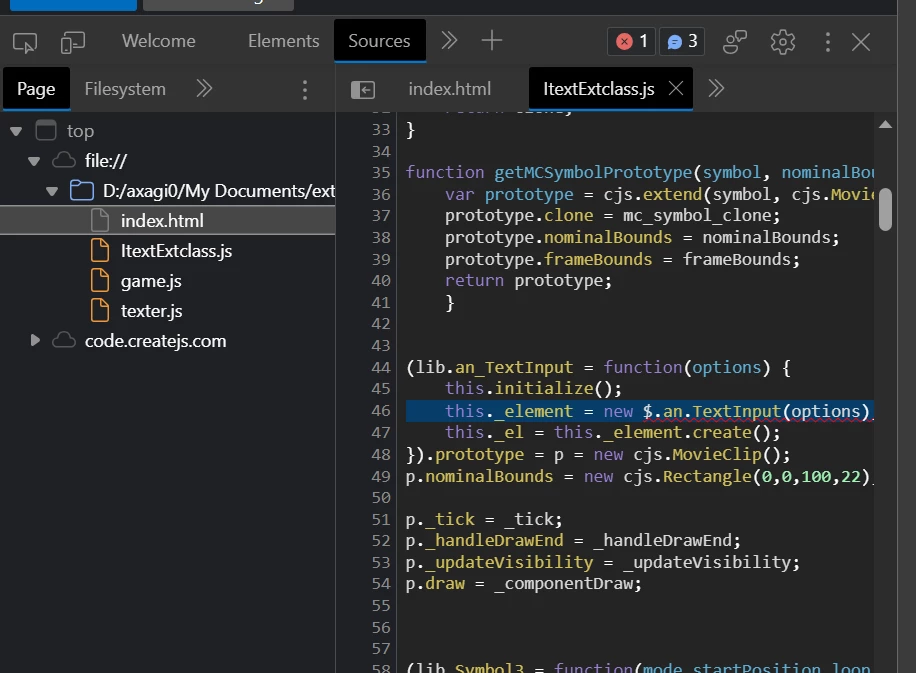
Any  ideas or other ways to make this work I would greatly appreciate working through it step by step

Thanks and have a great day

    This topic has been closed for replies.

    3 replies

    JoãoCésar17023019
    Community Expert
    Community Expert
    July 26, 2023

    To better understand your issue: do you need to create an input component instance at run time using an external class and without including the required script files in the Animate IDE?

    Inspiring
    July 27, 2023

    Yes as much as possible the idea to is to keep the code out of animate so that the coding can be edited with a code editor separate to the animate workspace.  I am working in an environment where previously only Html coding was taught- it is pretty dry and for someone like me who is more visual, I like the way animate can be used to visually place elements on the stage and choose colours etc, without them all having to be picked through code.  So I am trying to bridge between the two by using external classes to hold the code, but building the visual assets and ui using animate.  I am so sorry and not trying to be difficult - just trying to understand and make it work!

    (plus I think I am definitely getting somewhere, I am feeling positive about having two separate classes that are being utilised by this document- it is starting to make sense to me e.g. If I get this texter.js class to work handling input text and passing the variable, then I can reuse this class for every document after this that requires input text)

    Thanks for your time and patience

    kglad
    Community Expert
    Community Expert
    July 27, 2023

    do you and/or your friend understand what the include tab allows you to do?

    kglad
    Community Expert
    Community Expert
    July 25, 2023

    how are texter.js and Texter related/added to your animate project?

    Inspiring
    July 25, 2023

    Hi team,

    Again I am trying to implement object orientated coding and use classes to do jobs for my project.  texter.js is a separate class to handle the text input for the project.  Last time I was using the separate classes for a Choose your own adventure game.  So the component is sitting on the stage - but as I said I havent had the chance to add an instance name or anything for it, just having it on the stage causes an error.  I have tried to add the JQuery script to the index.html but I cant get it to work.  (so it isnt included in the example here)

    Here is the folder structure so far  https://github.com/subtlefly/text

    Download the .zip file, extract the folder and its set up to run if you click the index.html file (but because of the Textinput component on the stage it doesnt work.

    If you remove the Textinput component from the stage in the main project it runs fine (from the index.html file) and the external class texter can communicate with the dynamic text box on the stage.  The problem arises when I try to create a user input text field.  

    Thanks for having a look and let me know what you think

    kglad
    Community Expert
    Community Expert
    July 25, 2023

    i don't see any relationship between your js file and your fla file.

    JoãoCésar17023019
    Community Expert
    Community Expert
    July 25, 2023

    Hi.


    If a component is added to the stage in the author time, Animate adds jQuery automatically for the run time.


    But if you add a component at the run time, you have to add jQuery manually or leave a component instance hidden somewhere on the stage.


    Anyway, can you give us more details of how you are dealing with the component that you need?

    Regards,

    JC