
Known Participant
November 27, 2023
Answered

How to export outside stage

  • November 27, 2023
  • 1 reply
  • 545 views

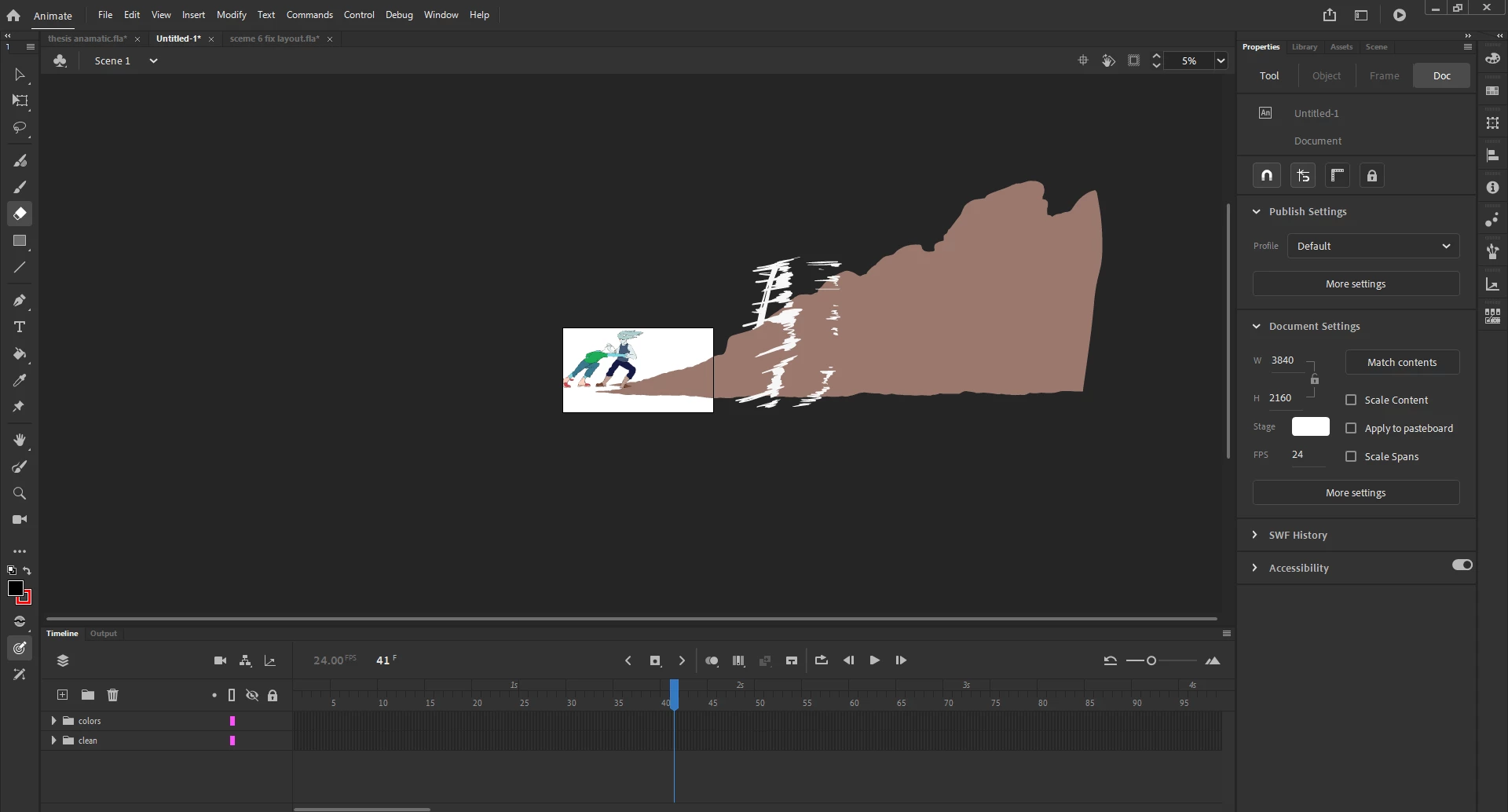
I've seen a similar post but I didn't understand the answer, but how do you export outside your stage? I have these drawings that I want to keep a certain size to keep their resolution when exporting them into After Effects, so is there a way to export drawings that go outside the stage as a PNG sequence? I've already tried clicking the minimum image area, didn't work.
    This topic has been closed for replies.
    Correct answer kglad

    there are limits on everything in animate. there's no way to extend those limits.

    1 reply

    kglad
    Community Expert
    Community Expert
    November 27, 2023

    change the stage size. there's even an auto setting for the stage. properties.

    Known Participant
    November 27, 2023

    Well, I tried that already. I maxed out the stage width and height (which seems to cap at 8192) and my animation still doesn't fit. I know I could scale it down, but since this is going to be a close up shot first in After Effects, i wouldn't want to lose quality if I scale it down.

    kglad
    Community Expert
    kgladCommunity ExpertCorrect answer
    Community Expert
    November 27, 2023

    there are limits on everything in animate. there's no way to extend those limits.