
Inspiring
June 28, 2016
Answered

how to install ipa (created with Adobe Air) to ipad

  • June 28, 2016
  • 1 reply
  • 1665 views

Dear Friends,

I have created an App for ipad using Adobe Air. it working fine when I compile and I made a package using an certificate created with mac computer and a .p12 also. I have created an ipa file it is connecting with itune and I can install it.. after installation the icon and app automatically getting hide or uninstalling form my ipad. what is the reason. please help me to install my ipa file created with Adobe air to ipad6. I used developer certificate as well as ad hoc too.. both giving same error.. just installing and immediately hiding or uninstalling. pls help me.

Thanks and Regards,

Syed Abdul Rahim
This topic has been closed for replies.
Correct answer kglad

i did downloaded and latest air sdk.. now while debug iam getting this error:

ipad: The device has encountered an unexpected error. Installation Error: MissingBundleIdentifier

same eror comes when pack and install in ipad. Pls help me to solve this..


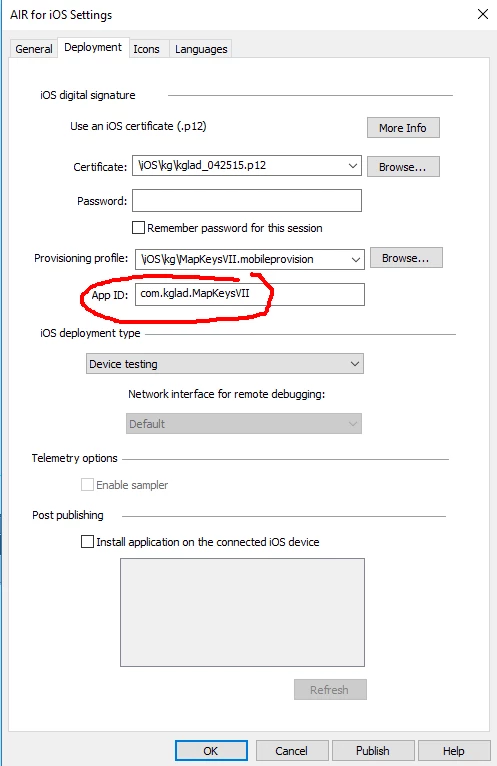
this must match the bundle id from the apple developer certificate page:

1 reply

kglad
Community Expert
Community Expert
June 28, 2016

what happens when you install using debug>debug movie>on device via usb?

rahimhajiAuthor
Inspiring
June 28, 2016

Dear Mr.kglad,

Greetings! thks for ur reply. i just converted as ipa file. Then uploaded in itunes ... then installed... it is just installing and uninstalling automatically.. instead of showig my app on the screen..... pls help me to solve this...

thanks and Regards,

Syed Abdul Rahim

kglad
Community Expert
Community Expert
June 28, 2016

again, what happens when you install using debug>debug movie>on device via usb?