How to Loop in Adobe Animate on Export
Hello, I made a short .2 second animation and I want to export it so that it will loop for 10 seconds. Is there a way for me to do this?

Is there instructions on how to do this? I am confused. It works when I click Test Scene but not when I export
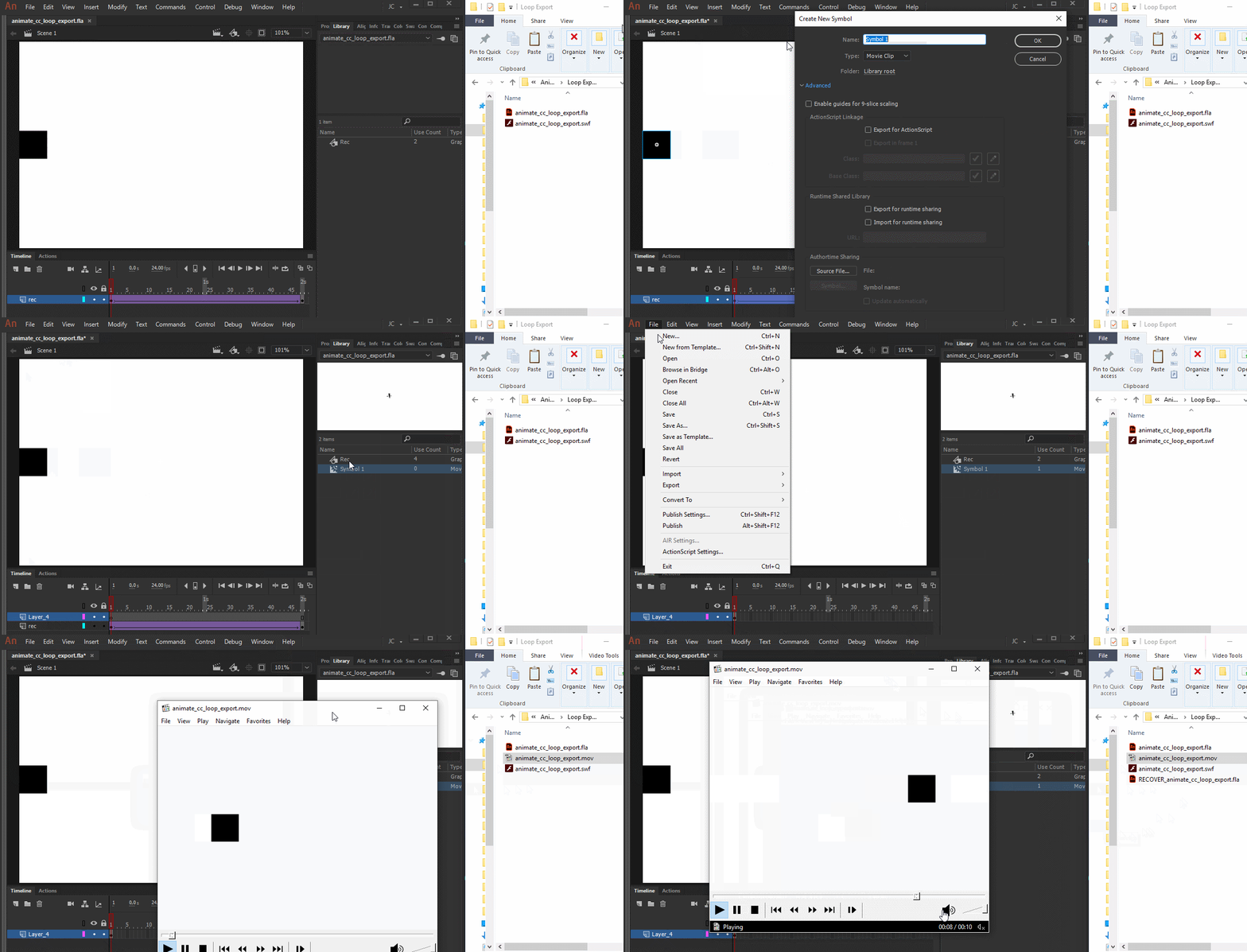
Hopefully this GIF will be able to show you how to achieve this.

Basically:
- Copy all the frames from the main timeline by selecting the frames, right-clicking them and choosing Copy Frames;
- Insert a new symbol: Insert > New Symbol... (Ctrl/Cmd + F8);
- Inside of this newly created symbol, paste the copied frames by right-clicking and choosing Paste Frames;
- Drag and a drop a instance from this symbol from the Library to the stage;
- Align this new instance;
- Go to File > Export > Export Video...;
- Under Stop exporting, select After time elapsed;
- Type 10.
More info about frames:
Use frames and keyframes in Adobe Animate
Please let me know if you still have any further question.
Regards,
JC
Already have an account? Login
No account yet? Create an account
Enter your E-mail address. We'll send you an e-mail with instructions to reset your password.