
HawkenKing
Known Participant
January 2, 2018
Answered

how to make pixel art non blurry on canvas export?

  • January 2, 2018
  • 2 replies
  • 1824 views

Pixel art can export with a resized canvas (as is the tried and tested way of Flash since the old days) crisply, like so:
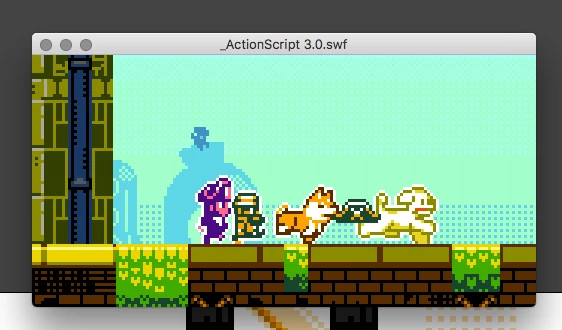
But since browsers no long support .swf, we are limited to Canvas export, however, the same resized canvas output looks like this:
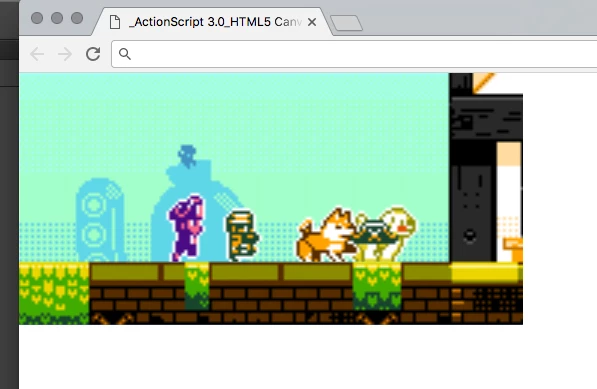
It would be nice if images set to not allow smoothing, were outputted without bilinear upscale filtering in Canvas for use with pixel art contents.

This topic has been closed for replies.
Correct answer Colin Holgate

That doesn't help, it's for snapping things at author time to the nearest pixel. It doesn't stop CreateJS from adding antialiasing to your sharp jaggy bitmaps at runtime. What would work is a CreateJS version of:

stage.quality = "low";

Found a page that helped to get a solution:

ctx = canvas.getContext("2d");

ctx.imageSmoothingEnabled = false;

2 replies

HawkenKing
Known Participant
January 2, 2018

Thanks, that worked a treat!

Joseph Labrecque
Community Expert
Community Expert
January 2, 2018

Does the Snap Bitmaps to Pixels option help?

HawkenKing
Known Participant
January 2, 2018

sadly not, that's only for layout