
Participant
November 29, 2022
Answered

How to place button "over" graphics above all other button layers?

  • November 29, 2022
  • 1 reply
  • 889 views

I have multiple buttons in layers on a timeline.  Because the buttons are in separate layers, the rollover state of each button pops up behind other buttons on the map. How do you make the rollover state appear above all other inactive buttons on higher layers in the timeline?  Screenshots attached.

    This topic has been closed for replies.
    Correct answer JoãoCésar17023019

    Apologies for my ignorance here I don't know how to assign the code to the timeline.  Here's what I have so far.  I'm sure I'm missing some code or functionality as the test still displays the popups underneath higher layers.


    Hi again.


    No need to apologize.


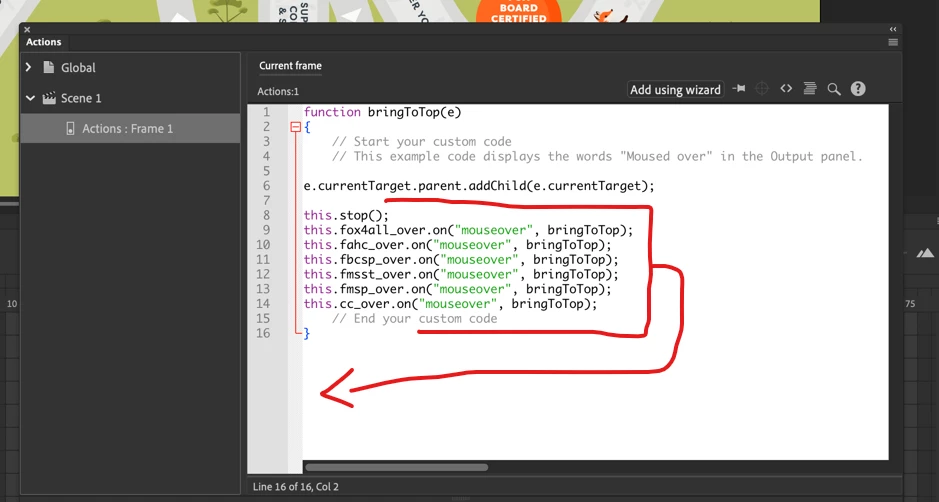
    You just need to move the lines that add the listeners from within the function body and place them in one of the lines below like in the image.
    1 reply

    JoãoCésar17023019
    Community Expert
    Community Expert
    November 29, 2022

    Hi.


    You can add event listeners to your buttons like this:

    function bringToTop(e)
    {
    	e.currentTarget.parent.addChild(e.currentTarget);
    }
    
    this.stop();
    this.yourButton0.on("mouseover", bringToTop);
    this.yourButton1.on("mouseover", bringToTop);
    this.yourButton2.on("mouseover", bringToTop);
    // and so on


    Regards,
    JC

    Participant
    November 29, 2022

    I will try to figure out how to do that thank you.

    JoãoCésar17023019
    Community Expert
    Community Expert
    November 30, 2022

    You're welcome.


    Please let us know if you need further assistance.


    Regards,

    JC