
Trial10
Inspiring
March 17, 2022
Answered

How to remove addEventListener when jumping between frames?

  • March 17, 2022
  • 1 reply
  • 456 views

Hi, I seem to have trouble removing addEventListeners when I jump between frames. When I jump back and forth, the addEventListeners still seem to stack up:
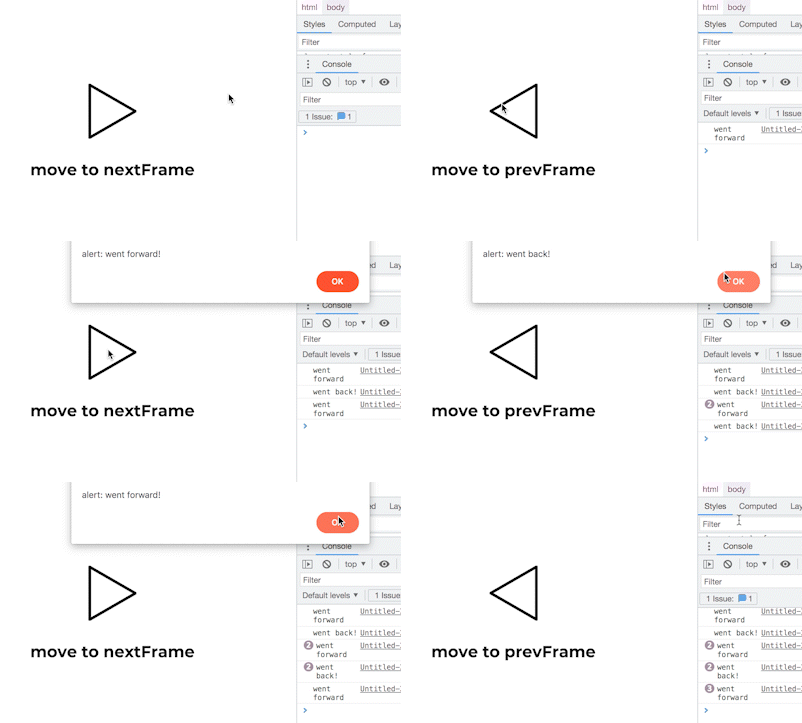


Frame 1 code:

this.stop();

this.arrowForward_btn.addEventListener("click", arrow_btnClickForward.bind(this));

function arrow_btnClickForward() {
	this.arrowForward_btn.removeEventListener("click", arrow_btnClickForward.bind(this));
	console.log("went forward");
	alert("alert: went forward!");
	this.gotoAndStop(1);
}


Frame 2 code:

this.arrowBack_btn.addEventListener("click", arrow_btnClickBack.bind(this));

function arrow_btnClickBack() {
	this.arrowBack_btn.removeEventListener("click", arrow_btnClickBack.bind(this));
	console.log("went back!");
	alert("alert: went back!");
	this.gotoAndStop(0);
}


How do I remove the addEventListeners so that they don't stack up?

This topic has been closed for replies.
Correct answer ClayUUID

.bind() returns a new, unique function reference every time it's called on a function, so of course you can't use it with removeEventListener().


Since you're attempting to remove the event inside its own event handler, you can use evt.remove()

https://www.createjs.com/docs/easeljs/classes/Event.html


Or, instead of using .addEventListener(), you could just use .on() with the once flag.

https://www.createjs.com/docs/easeljs/classes/EventDispatcher.html#method_on


1 reply

ClayUUIDCorrect answer
Legend
March 17, 2022

.bind() returns a new, unique function reference every time it's called on a function, so of course you can't use it with removeEventListener().


Since you're attempting to remove the event inside its own event handler, you can use evt.remove()

https://www.createjs.com/docs/easeljs/classes/Event.html


Or, instead of using .addEventListener(), you could just use .on() with the once flag.

https://www.createjs.com/docs/easeljs/classes/EventDispatcher.html#method_on


Trial10
Trial10Author
Inspiring
March 17, 2022

Thanks! evt.remove(); works great after I added it into the functions.


Frame 1 code:

this.stop();

this.arrowForward_btn.addEventListener("click", arrow_btnClickForward.bind(this));

function arrow_btnClickForward(evt) {
	console.log("went forward");
	alert("alert: went forward!");
	this.gotoAndStop(1);
	evt.remove();
}

Frame 2 code:

this.arrowBack_btn.addEventListener("click", arrow_btnClickBack.bind(this));

function arrow_btnClickBack(evt) {
	console.log("went back!");
	alert("alert: went back!");
	this.gotoAndStop(0);
	evt.remove();
}