
Known Participant
June 2, 2022
Answered

How To Remove OR Overwrite Custom Eases

  • June 2, 2022
  • 1 reply
  • 641 views

Hey, so im using custom eases in my project but everytime a make a slight tweak to one of them becuase i dont like how it looks it makes a new ease and now i have like 20 eases that i cant delete or anything. Is there a way to have the change just overide the one that is alreayd there
    This topic has been closed for replies.
    Correct answer JoãoCésar17023019

    Hi.


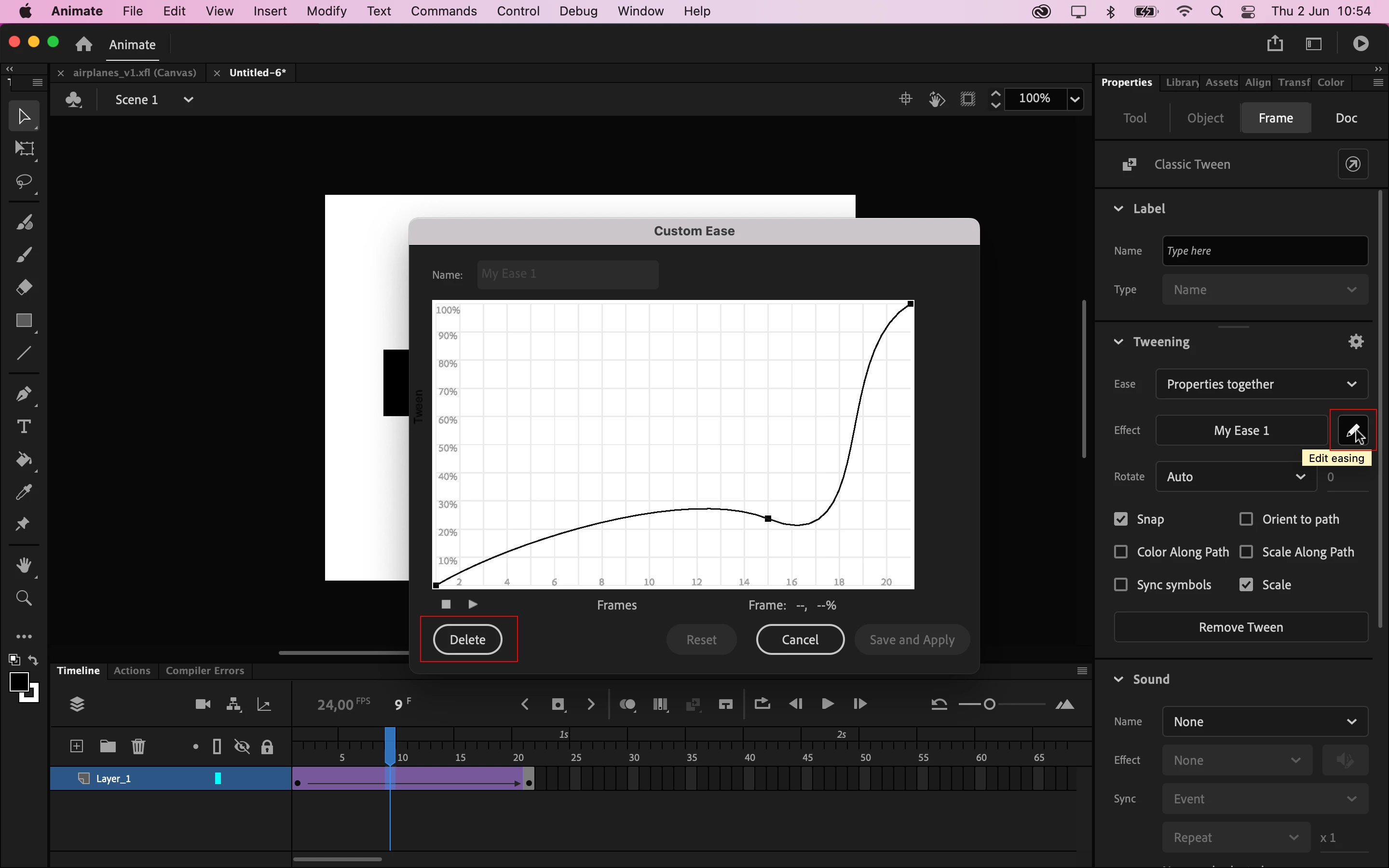
    There's a pencil icon on the right side of the ease effect button. You can click on this pencil icon to edit the current selected tween or to delete it (if it's a custom ease).


    I hope it helps.


    Regards,

    JC

    1 reply

    JoãoCésar17023019
    Community Expert
    JoãoCésar17023019Community ExpertCorrect answer
    Community Expert
    June 2, 2022

    Hi.


    There's a pencil icon on the right side of the ease effect button. You can click on this pencil icon to edit the current selected tween or to delete it (if it's a custom ease).


    I hope it helps.


    Regards,

    JC