Participant
March 26, 2022
Answered

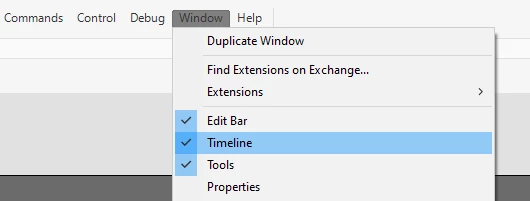
How to reopen the timeline on Adobe Animate

  • March 26, 2022
  • 2 replies
  • 2027 views

Sorry this is probably the most stupid question on this forum but I accidently clicked the x on the timeline and I have got no clue how to reopen it and I've got something due tonight :/.

    This topic has been closed for replies.
    Correct answer n. tilcheff

    Window > Timeline


    2 replies

    Colin Holgate
    Inspiring
    March 26, 2022

    Nick gave you an exact answer, but a related thing to know about is workspaces. Choose Window menu, Workspaces, and try out some of the presets. A few of them feature the timeline, but also arrange other panels in a way that makes the best use of your screen, for that kind of workflow.

    n. tilcheff
    n. tilcheffCorrect answer
    Legend
    March 26, 2022

    Window > Timeline


    Nick - Character Designer and Animator, Flash user since 1998 | Member of the Flanimate Power Tools team - extensions for character animation
    Participant
    March 26, 2022

    Thank you so much I'm gonna speedrun this assignment now.

    n. tilcheff
    Legend
    March 26, 2022

    Good luck, mate!


    Nick - Character Designer and Animator, Flash user since 1998 | Member of the Flanimate Power Tools team - extensions for character animation