

Answered
How to scaleX an object from the side, instead of centered?
I managed to create a progress bar where I used queue.on("progress", handleProgress); to change the scaleX of a movieclip I named as bar_mc.
var queue = new createjs.LoadQueue();
queue.on("complete", handleComplete);
queue.on("progress", handleProgress);
queue.loadFile({
    id: "img",
    src: "images/image.jpg"
});

function handleComplete(evt) {
    console.log("Done!");
    createjs.Ticker.removeAllEventListeners();
};

function handleProgress(event) {
    console.log("Event Loading: " + (queue.progress.toFixed(2) * 100) + "%");
};

createjs.Ticker.addEventListener("tick", handleTick.bind(this));

function handleTick(event) {
    console.log("ticking");
    this.bar_mc.scaleX = queue.progress;
};
It works, but it starts at the center like in a):
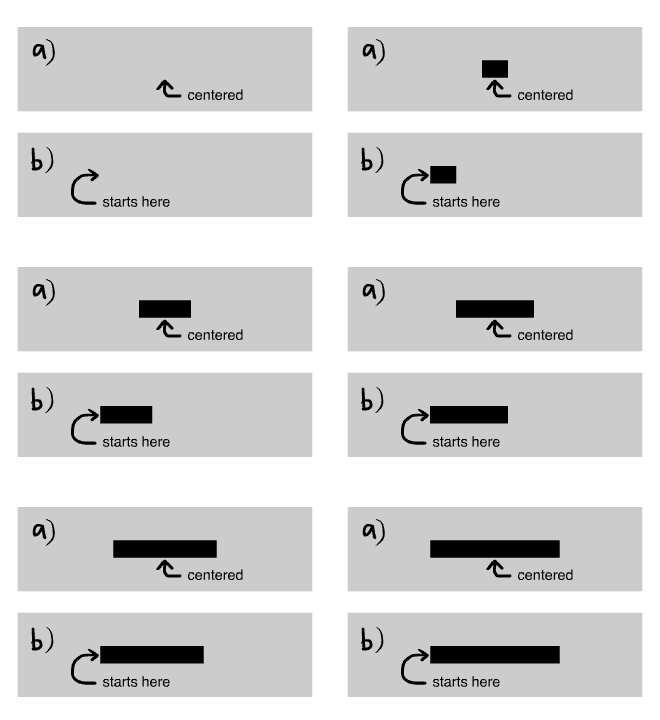
How do I make it start from the side like in b)?
Also, this gave me an error when I tried it, but is there a way to put the this.bar_mc.scaleX into function handleProgress(event) instead of using a separate ticker function to animate bar_mc?



 AdChoices