Participating Frequently
January 3, 2019
Answered

How to set global variable?

  • January 3, 2019
  • 1 reply
  • 6691 views

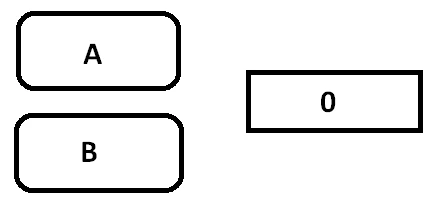
I have following UI:

When I press A button or B button, output result will be: value += 1, I don't know how to store global variable, you can show me a link or some keywords to resolve problem ...?! Thanks for reading!

This topic has been closed for replies.
Correct answer JoãoCésar17023019

Hi.

When you say "global" I understand you want a variable that is available for all these UI elements, right?

If so, you can write something like this:

HTML5 Canvas:

var result = 0;

function setResult(e)

{

    this.outputText.text = String(++result);

}

this.buttonA.on("click", setResult, this);

this.buttonB.on("click", setResult, this);

AS3:

import flash.events.MouseEvent;

var result:uint = 0;

function setResult(e:MouseEvent):void

{

    outputText.text = String(++result);

}

buttonA.addEventListener(MouseEvent.CLICK, setResult);

buttonB.addEventListener(MouseEvent.CLICK, setResult);

I hope this helps.

Regards,

JC

1 reply

JoãoCésar17023019
Community Expert
JoãoCésar17023019Community ExpertCorrect answer
Community Expert
January 3, 2019

Hi.

When you say "global" I understand you want a variable that is available for all these UI elements, right?

If so, you can write something like this:

HTML5 Canvas:

var result = 0;

function setResult(e)

{

    this.outputText.text = String(++result);

}

this.buttonA.on("click", setResult, this);

this.buttonB.on("click", setResult, this);

AS3:

import flash.events.MouseEvent;

var result:uint = 0;

function setResult(e:MouseEvent):void

{

    outputText.text = String(++result);

}

buttonA.addEventListener(MouseEvent.CLICK, setResult);

buttonB.addEventListener(MouseEvent.CLICK, setResult);

I hope this helps.

Regards,

JC

KirimaruAuthor
Participating Frequently
January 3, 2019

I used HTML canvas, it working like a charm, definitely I'il face other problems in project, I hope when it happen, you still here

JoãoCésar17023019
Community Expert
Community Expert
January 3, 2019

Excellent!

You can count on us!

Regards,

JC