
Participant
September 5, 2018
Question

How to stop audio layer playing in a separate scene?

  • September 5, 2018
  • 1 reply
  • 270 views

Right- I have a music file dropped into a layer in my first scene. 2 scenes later, I want the music to stop. It would start playing in scene 1 and stop playing in scene 3. Currently the music has these settings:
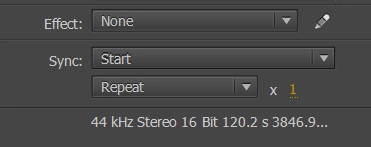
When I press ctrl+enter, the music continues to play after the animation loops around again, and also starts playing again. So there's like two layers of music.

How do I make the music stop in a separate scene?

This topic has been closed for replies.

1 reply

Robert Mc Dowell
Legend
September 5, 2018

how do you make this music play? NetStream? Sound?

FlatJimAuthor
Participant
September 5, 2018

Well, I'm actually completely new to animate, but I basically imported the

mp3 track to my library, made a new layer in my scene and dragged the music

from my library onto the stage. Hope you can still help

On Wed, 5 Sep 2018, 7:19 PM Robert Mc Dowell <forums_noreply@adobe.com>

Robert Mc Dowell
Legend
September 5, 2018

ok so the mp3 must be considered as a Sound object.

Sound - Adobe ActionScript® 3 (AS3 ) API Reference

myMp3Sound.close() should be the right thing for you