
Participant
December 11, 2024
Question

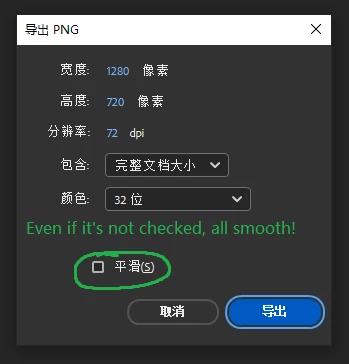
How to turn off smoothing when exporting a movie PNG sequence?
  • December 11, 2024
  • 1 reply
  • 191 views

When I execute the command "File - Export - Export Movie", after choosing to save it in PNG format, a dialog box pops up with a "Smooth" option, but no matter whether I select it or not, the exported image is smooth! This option does not play any role.

My Animate version is 2024.



1 reply

Mario_CR
Community Expert
Community Expert
December 13, 2024

You're right, that option does nothing. You may report the bug here: https://www.adobe.com/products/wishform.html


A workaround you can try is opening the Actions panel (F9) and type this on frame 1 of any layer:

stage.quality = "low"

Doing this will disable anti-aliasing on the SWF export. However this alone won't work with exported images since they're rendered from the stage, not the SWF.

To avoid this and get an aliased PNG you need to export the PNG from File > Export > Export Video/ Media and choose the PNG sequence preset.

This is recorded from the aliased SWF > to a lossless mov > to a sequence, giving you a slightly better result in this case.

Participant
January 3, 2025
    Thank you very much for your reply. Although this method is not convenient, it has successfully solved my problem! "Binarization" is very important in the animation industry process. It's already the version of CC 2024, yet such a low-level mistake has occurred. Adobe is really puzzling. I hope this problem can be solved in the next version.
    Thank you again for your generous answer!