
Known Participant
April 18, 2013
Answered

How to use Registration points to stretch and rotate a MovieClip Correctly
  • April 18, 2013
  • 2 replies
  • 542 views

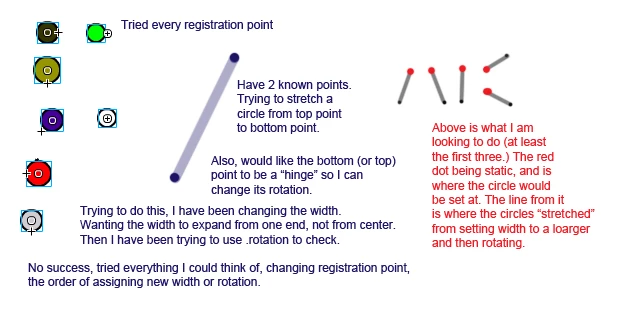
Is kind of an explanation of what I am trying to do.

I have 2 known points, a slope, the angle I want it to rotate to, and the hypotenuse.

I've spent at least an hour trying different things, and googling.

Any idea on what I should do? Currently just setting the width larger, and then using .rotation.

Thanks.

This topic has been closed for replies.
Correct answer kglad

use a top center reg point.  assign your circle's x,y to match the upper point's x,y.  then assign the circle's width and height to be distance between the two points and finally its rotation to be the atan2 between the two points:

circle_mc.x = p1.x;

circle_mc.y = p1.y;

circle_mc.width = circle_mc.height = Math.sqrt((p2.y-p1.y)*(p2.y-p1.y)+(p2.x-p1.x)*(p2.x-p1.x));

circle_mc.rotation = -90+ 180*Math.atan2(p2.y-p1.y,p2.x-p1.x)/Math.PI;

2 replies

Known Participant
April 18, 2013

Thank You. That was exactly what I was looking for! Works exactly how I wanted it to.

One thing I removed the mc.width part, it was causing a large circle to be between the points. So I took that out and left it to default.

kglad
Community Expert
Community Expert
April 18, 2013

you're welcome.

kglad
Community Expert
kgladCommunity ExpertCorrect answer
Community Expert
April 18, 2013

use a top center reg point.  assign your circle's x,y to match the upper point's x,y.  then assign the circle's width and height to be distance between the two points and finally its rotation to be the atan2 between the two points:

circle_mc.x = p1.x;

circle_mc.y = p1.y;

circle_mc.width = circle_mc.height = Math.sqrt((p2.y-p1.y)*(p2.y-p1.y)+(p2.x-p1.x)*(p2.x-p1.x));

circle_mc.rotation = -90+ 180*Math.atan2(p2.y-p1.y,p2.x-p1.x)/Math.PI;