
Inspiring
April 8, 2022
Question

HTML5 Canvas - Constrain image/SVG scaling to stage size

  • April 8, 2022
  • 1 reply
  • 319 views

I am using createjs.Bitmap to add an SVG to the stage.


The project is using a responsive layout..


The problem is the SVG does not scale relative to the stage and other elements around it.


var patientImagePath = data['patient_image_path']

patientImage = new createjs.Bitmap(patientImagePath);

patientImage.x = 96;
patientImage.y = 36.05;
patientImage.scaleX = 0.16;
patientImage.scaleY = 0.16;

root.patientDetailsModal.addChild(patientImage);

'Normal' view on large monitor:
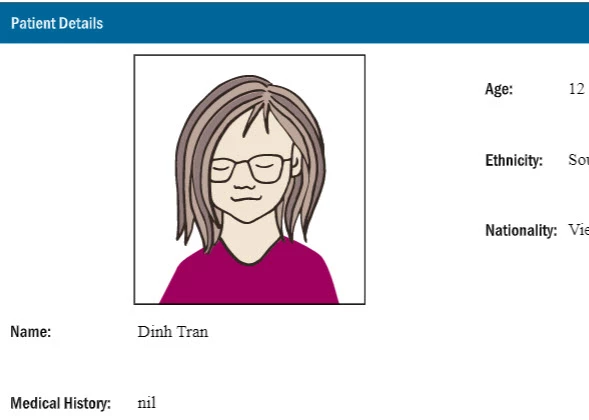


and after reducing the browser size using dragging (not using zoom...).
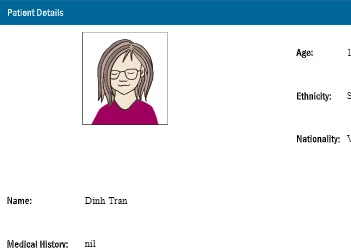


Any solutions?

    This topic has been closed for replies.

    1 reply

    FlatChatAuthor
    Inspiring
    April 8, 2022

    If I just import the SVG to the stage, without using new createjs.Bitmap, then the SVG scales fine.


    But I need to load the SVGs dynamically...


    FlatChatAuthor
    Inspiring
    April 8, 2022

    Also, looking at the SVG code, the viewBox is:

     viewBox="0 0 151.5 163.7"


    But if I don't apply the scale at:

    patientImage = new createjs.Bitmap(patientImagePath).set({scaleX: 0.16, scaleY: 0.16}); 


    Then the image is loaded in a really enormous size.  I think the problem of scaling might be dealt with if the SVG just loaded in its viewbox size...

    FlatChatAuthor
    Inspiring
    April 8, 2022

    UPDATE


    Changed the format to PNG, and without scaling, comes in at it's original size (151.5 x 163.7), which is perfect. However, I want to use SVG, not PNG.


    It seems the SVG just gets scaled up to a huge size despite the viewport size...