


Participating Frequently
April 10, 2017
Answered

HTML5 code snippets placed on buttons not working when published but do work while testing inside Animate CC.

  • April 10, 2017
  • 1 reply
  • 8153 views

What step am I missing to make this function work? The snippets I am using are "click to go to frame and stop". When published, these buttons are not taking me to a new frame. I have the latest version of Animate CC and am using OS 10.11.6. Please help.

Correct answer Colin Holgate

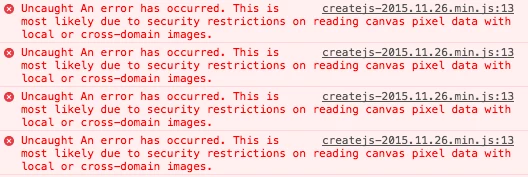
Gotcha! Thanks, ok.. Here's what I'm getting - lots of errors, here's what they all tend to look like:


It looks like the error only happens in Chrome. The problem seems to be when there is a bitmap that is inside a button. You could get the same effect by having a button that only has a hit area frame, and sit that on top of the bitmap. That seems to solve the errors in Chrome.

1 reply

Colin Holgate
Inspiring
April 10, 2017

Look in the browser developer console to see if there are any errors. It could be that you're testing as local files, and that has different security conditions than when you're testing from Animate. If the files are due to be used online, try putting them online now, that would then be the same security conditions.

macpawel
Participating Frequently
April 10, 2017

By default if you publish HTML Canvas banner it usses hosted JavaScript Library - it may leads to problems with preview

Try in Publish Settings window and use Advanced Tab and here uncheck Hosted Libraries option.

Publish your work again - maybe it helps?

Pawel

Participating Frequently
April 10, 2017

macpawel thank you too for your input!