Participant
June 29, 2019
Answered

HTML5 custom text embed in Animate CC

  • June 29, 2019
  • 1 reply
  • 10290 views

Hello world!

I want to make an animated banner in Animated CC HTML Canvas and I have to use a custom font "Bebas Kai".
Please tell me if Animated CC automatically embeds fonts in HTML Canvas? Convert font to graphic symbol!

The font does not want to be indexed by Google or worse to change depending on what the viewer has in the PC
Thank you very much for your support!

Correct answer JoãoCésar17023019

Hi.

- Static text fields: Animate exports the texts as raw vector shapes or bitmaps depending on your publish settings. The disadvantage of static texts is that you cannot change them with code and they may cause a negative impact on performance if you use a lot of them.

- Dynamic text fields: you get actual texts. You can change them with code, they may be better for performance, but you're gonna have to provide the font families using one of the following methods:

- Web fonts:

Using Adobe Fonts in Animate

Using Google fonts in Animate CC

- CSS @font-face Rule

CSS @font-face Rule

Example:

@font-face

{

    font-family: 'EthnocentricRg-Regular';

    src: url("fonts/ethnocentric rg.ttf");

}

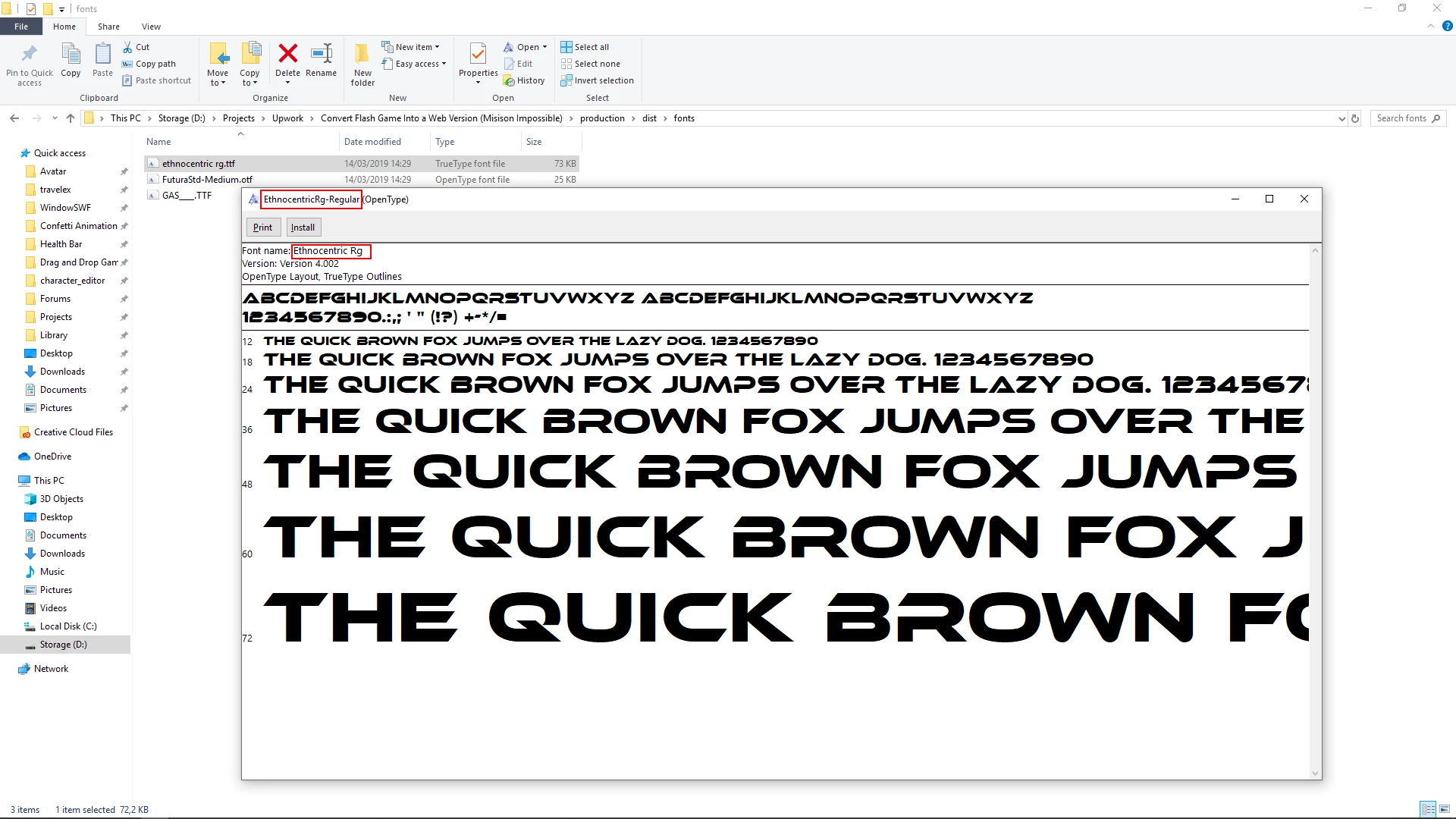
On Windows, the font-family property value should be the name in the title of the font dialog window or in the Font name field, like in the image below.
- CSS Web Safe Fonts

CSS Web Safe Fonts

I hope this helps.

Regards,

JC

1 reply

JoãoCésar17023019
Community Expert
JoãoCésar17023019Community ExpertCorrect answer
Community Expert
June 29, 2019

Hi.

- Static text fields: Animate exports the texts as raw vector shapes or bitmaps depending on your publish settings. The disadvantage of static texts is that you cannot change them with code and they may cause a negative impact on performance if you use a lot of them.

- Dynamic text fields: you get actual texts. You can change them with code, they may be better for performance, but you're gonna have to provide the font families using one of the following methods:

- Web fonts:

Using Adobe Fonts in Animate

Using Google fonts in Animate CC

- CSS @font-face Rule

CSS @font-face Rule

Example:

@font-face

{

    font-family: 'EthnocentricRg-Regular';

    src: url("fonts/ethnocentric rg.ttf");

}

On Windows, the font-family property value should be the name in the title of the font dialog window or in the Font name field, like in the image below.

- CSS Web Safe Fonts

CSS Web Safe Fonts

I hope this helps.

Regards,

JC

nicuvAuthor
Participant
June 30, 2019

Thanks a lot for the answer.


That's what I want, the text exported into vectors. I will have many banners so far I make the text in Adobe Illustrator and convert it into shape then import it into Animate CC but with a lot of banners I will waste a lot of time to make the text in the Illustrator and then bring it to Animated
Please tell me how I can set the font export in vector or bitmap, I do not find the option in Publishing Settings and why this has a negative impact on Benner's performance.

Many thanks