
Participant
August 16, 2017
Answered

HTML5 Image Output bug.

  • August 16, 2017
  • 2 replies
  • 486 views

This is something that's been bugging me for a while and am pretty surprised it's still an issue.

Images in an HTML5 Canvas output to the images folder fine BUT if you replace a symbol containing images the old images are cached and output instead of te updated files. Screen grab shows image 3.jpg in Animate - and the output file _3.jpg (sometimes just 3.jpg).
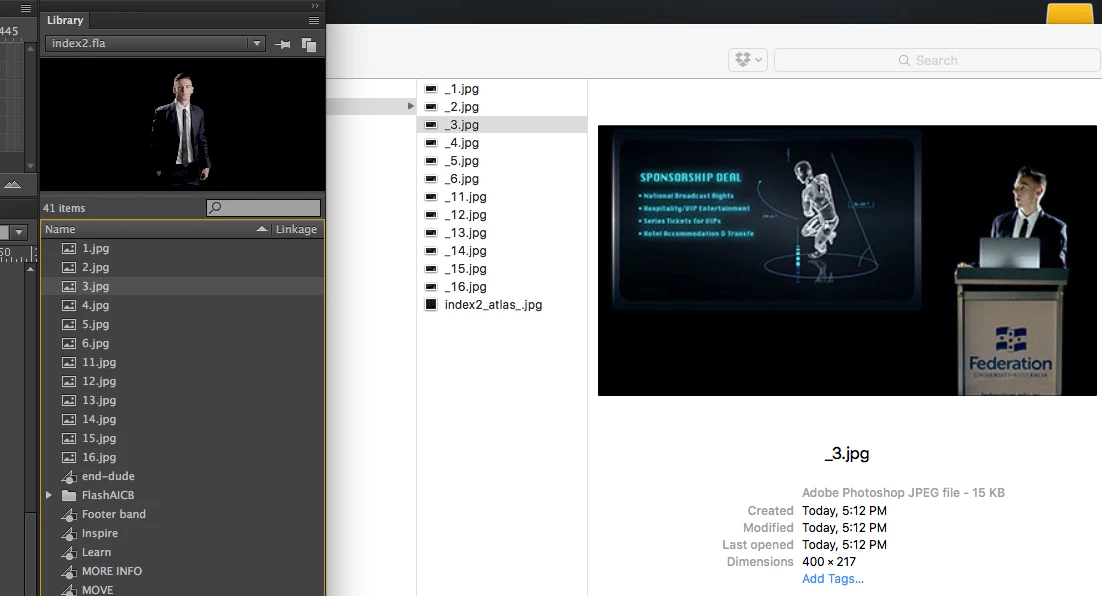
If I output a sprite-sheet the correct image is pulled BUT it stretches the image:

This is what it should look like (screen grab from Animate):

As far as I can tell - the only way to avoid this is to delete and re-import the images (which works). But this actually poses a massive issue in my current project as I need the positions of all images consistent. I will lose their positioning in 7 x 6 animations. </vent>

If anyone has a fix or workaround I'd love to hear it.

    This topic has been closed for replies.
    Correct answer Colin Holgate

    The Control menu has Clear Publish Cache. That might be worth trying.

    I think the only time I've seen the same issue was in an older version of Flash Pro, before Adobe added the random numbers when doing test. Normally you would do Test Movie every time you want to test, then File/Publish to make the final version for uploading to your server. The test movie version includes a random number all over the place, to make sure the previously cache assets are not being used.

    Before that was added you had to constantly clear browser cache to get the latest images.

    Still, your variation may be new, and it could be worth logging a bug about it:

    Feature Request/Bug Report Form

    2 replies

    UDESCO
    Participating Frequently
    August 17, 2017

    Please share your test file along with detailed steps to help replicate this issue.

    Participant
    August 17, 2017

    Thanks for the replies. Clear Publish Cache DID work. Although interestingly, the FIRST in a series of images sometimes does not refresh - I need to re-import that image using the image Info dialogue.

    Colin - to clarify: The caching is not in the browser - it's out of Animate. So the numbering of URLs would not fix. Quitting, restarting Animate does not fix it either. The caching is somehow in the document itself.

    Nipun I'd be happy to set up a sample document fo you once I get a moment. Would a zipped package via FTP link be appropriate?

    Participant
    August 16, 2017

    OK I found a work-around... (for all those out there in Google-Land)

    Double-clicking an image in the library, accessing the image settings tab and getting Animate to compress the image forces it to take a look at and render the correct image.

    Still a bug. Should be fixed.

    Colin Holgate
    Colin HolgateCorrect answer
    Inspiring
    August 16, 2017

    The Control menu has Clear Publish Cache. That might be worth trying.

    I think the only time I've seen the same issue was in an older version of Flash Pro, before Adobe added the random numbers when doing test. Normally you would do Test Movie every time you want to test, then File/Publish to make the final version for uploading to your server. The test movie version includes a random number all over the place, to make sure the previously cache assets are not being used.

    Before that was added you had to constantly clear browser cache to get the latest images.

    Still, your variation may be new, and it could be worth logging a bug about it:

    Feature Request/Bug Report Form