Hi Aldor
I had a look at your file. The problem that the video disappears after coming back to frame 0 (the first frame) doesn't occur for me. I'm a little unsure, maybe your version of the video component is somewhat wrong or old. Look at this:
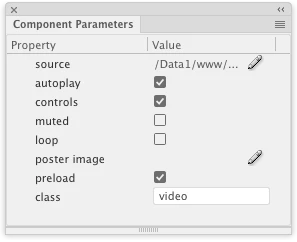
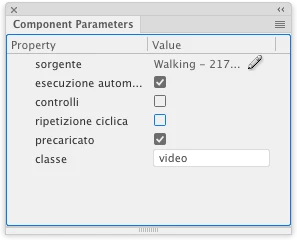
On the left is the Component Parameters panel in my Animate Version 19.0, on the left is yours. There are some options missing in yours. Which version of Animate are you using?
However, there was a problem in the code, which I admit, came from me with my mistake. The two click eventHandlers for t_next and t_prev are added each time you come back to frame 0 where the code is. This produced quite weird problems like jumping to the next happened twice or more times on just one click depending how often one marched repeatedly through the frames. Because in your setup there are only 3 altogether, this weirdness came about very easily.
Try using in your file test_video.fla (the one you shared) this new code:
var here = this;
var lastFrame = here.totalFrames - 1;
here.stop();
here.clickHandler = function (e) {
var etn = e.target.name;
var nextFrame;
if (etn == "t_next") {
nextFrame = here.currentFrame + 1;
if (nextFrame > lastFrame) {
nextFrame = 0;
}
here.gotoAndStop(nextFrame);
} else if (etn == "t_prev") {
nextFrame = here.currentFrame - 1;
if (nextFrame < 0) {
nextFrame = lastFrame;
}
here.gotoAndStop(nextFrame);
}
};
if (!here.started) {
here.on("click", here.clickHandler, here, false);
here.started = true;
}
I'm using here only one eventHandler for the clicks. This way I need to make just one time sure that the handler is added only once through If(!here.started). The next time coming to frame 0 here.started is true and the eventHandler isn't added anymore. This code enables also that the series of frames can be looped. When one comes to the last frame, the code sends the playhead back to the first frame. Similar it deals with going back.
With this the video plays fine everytime one reaches frame 0. Try it out.
Klaus




 AdChoices