
Participant
February 26, 2020
Question

I can't import videos into Adobe Animate CC 2017

  • February 26, 2020
  • 2 replies
  • 3162 views

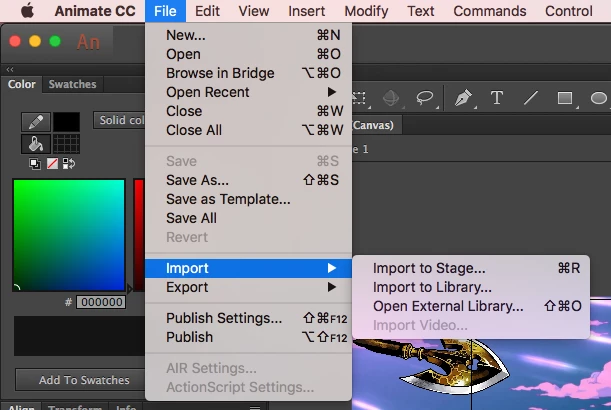
When I try to either drag a video file to the library or canvas, or I try to import via the menu, I get a pop-up that says "One or more flies were not imported becuase there were problems reading them." I get this box for MP4, FLV, and F4V. Please help, the assignment I'm working on is due by the end of the week and my imtructor doesn't know either. I also can't directly import a video, as seen in the attached image.
This topic has been closed for replies.

2 replies

Colin Holgate
Inspiring
March 11, 2020

That is an HTML5 Canvas FLA, if you want video you would use the Video component. If you're creating an animation to go on top of a video, the highest quality approach is to use an ActionScript 3.0 FLA, import an H.264 video (that can be any quality), create your animation and then export it using a codec that includes an alpha channel. You then combine the animation video with the high quality version of your imported video, instead After Affects or Premiere.

Inspiring
March 4, 2020

Hi,

Did you try using the FLVPlayback component? There are 2 (Window > Components) that make working witth video import super simple. The first (FLVPlayback 2.5 has more properties that can be set from the Window > Component Parameters dialog. Both have the field labeled Source that allows you to navigate to the video on your hard drive. You can play and manipulate external video files without using a component, but its use often provides the best way to work with video. 

Hope this helps