

Inspiring
Mar 31, 2024 12:50 AM UTC
Question

I have direct x 12 and feature levels 12_1. But the fuild brush is grayed out.

there is feature levels 12_1
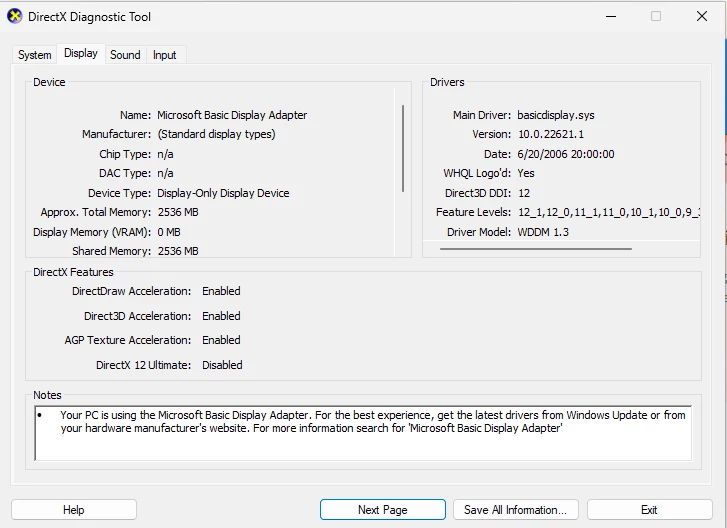

 Fluid Brush is grayed out an  cannot be clickable

This topic is closed to new replies. Start a new post to keep the conversation going.

13 replies

Mario_CR
Community Expert
Community Expert
Mar 31, 2024 1:25 AM UTC

What is your GPU? It should show up in Chip Type and DAC Type but it's missing...


Check the 'Notes' section at the bottom, Microsoft Basic Display Adapter is a generic Windows driver, normally it'd show something Intel / AMD / Nvidia. Find your gpu model and update your drivers from the manufacturer's website.

Translate
kglad
Community Expert
Community Expert
Mar 31, 2024 1:01 AM UTC

close animate

restart your computer 

open animate

check the fluid brush

Translate
Inspiring
Mar 31, 2024 12:43 PM UTC

I did that but it's not working. Do you have any alts?

Translate
kglad
Community Expert
Community Expert
Mar 31, 2024 1:45 PM UTC

update your ms driver. it's from 2006.

Translate