


December 31, 2018
Answered

I'm trying to import a .PSD file but it's merging pixels from different layer into the wrong one.

  • December 31, 2018
  • 2 replies
  • 676 views

I'm making a background in Photoshop, but I'm stuck with a big problem.

Here I have a doodle with two layers, the BLUE outline, and the WHITE fill.
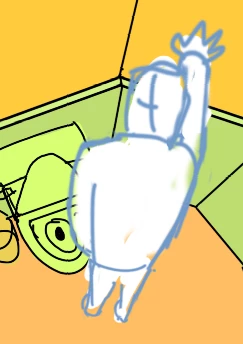
But it's taking pixels from the white and moving them into the BLUE outline layer, just like this.
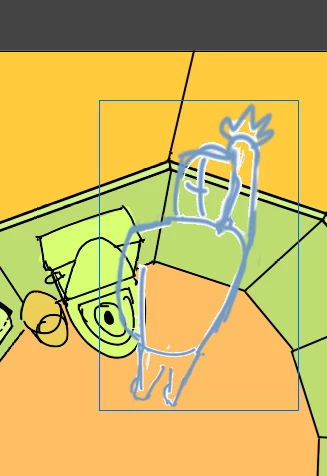
This is happening in every layer, and in every .PSD file I import.

I don't know what I'm doing wrong, I'm importing every layer in lossless quality, maybe the problem is coming from Photoshop but I'm not really sure, some advice would be appreciated.

This topic has been closed for replies.
Correct answer JoãoCésar17023019

Hi.

You're not doing anything wrong. This is really an issue.

Please have a look at this answer:

Re: Importing overlaying Photoshop layers produces unwanted artifacts

Regards,

JC

2 replies

January 3, 2019

Thank you, what a stressful situation, I saw in the other thread that you could import the PSD file to Illustrator, save it right there, and import that file to Animate, could you be so kind to explain that process?

JoãoCésar17023019
Community Expert
Community Expert
January 3, 2019

Hi.

What thread and process are you referring to?

Did you try the solution from the thread above? What were the results?

Regards,

JC

Participant
June 11, 2020

Hi João,


This link is broken. it leads to the main forum page.

Is there a solution for this issue?


thanks


JoãoCésar17023019
Community Expert
JoãoCésar17023019Community ExpertCorrect answer
Community Expert
December 31, 2018

Hi.

You're not doing anything wrong. This is really an issue.

Please have a look at this answer:

Re: Importing overlaying Photoshop layers produces unwanted artifacts

Regards,

JC