When you say you're familiar with animation what exactly do you mean? As in watching it? If you know anything about animation it is literally redrawing the character every frame. Animate does help that a bit by allowing you to simply rotate symbols so you can animate then, but you still have to draw the art to do so. Doing this is a complicated process but I'll try to break down a bit. I hope it's clear.
A keyframe simply means you are holding that drawing until you create a another keyframe. So you would have one keyframe of a man standing there. Go to frame 15 and select it and then hit F5. You now have a frame range of 15 frames. Now select frame 15 again and hit F7 on your keyboard and it will create an empty keyframe. turn on your Onion Skin tool which is the first tool on the left under the timeline. (the first set of double boxes)

that will allow you to see a ghost of the previous drawing. Draw the man now with his arm up like he's going to wave. Now select frame 20 and hit F7 again. Draw a new drawing extending the arm out a bit as if he's thrusting his arm outward a bit. Now on frame 24 hit F7 again and it will create another empty keyframe. Go back to frame 20 and select that art by clicking the keyframe then hit Command C on your keyboard or Control C if you're on a PC and then go to frame 24 and click the empty keyframe and hold down Shift Command or Shift Control and it will paste the art from frame 20 which is in your clipboard onto the stage and it will also register the art in exactly the same position as it was on frame 20. Now click drag in one smooth motion across frame 20 to 25 and the selected frames will turn yellow. Now right click on those frames and select Copy Frames.
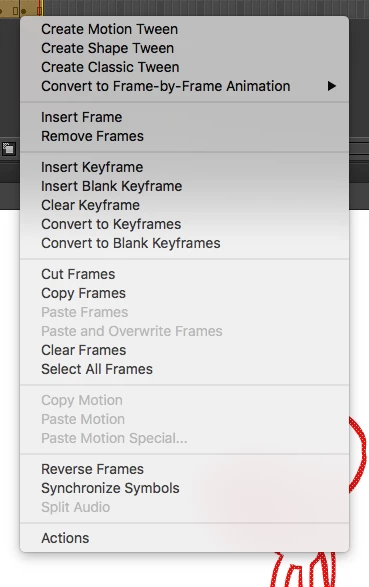
Now go to frame 26 and right click again but this time select Paste Frames and it will paste the copied art on the timeline. Now you have a frame range of 30. Select frame 31 and paste the art again using the same procedure as above by right clicking and selecting Paste Frames. Now go back to frame 1 and copy it as well and paste it on frame 36. You now have a man standing there, he raises his hand waves a few times and then lowers his hand again. IF you want it to be smoother you could again hit F7 on say frame 12 and it will give you an empty frame whereby you can turn on Onion skinning and inbetween the two drawings so that the arm moves sightly up. When you turn on Onion skinning again you will see some brackets above the timeline. You can drag them outward to see the ghost of the next position so you can inbetween the drawings. I hope this helps a bit. I've attached a file I did that essentially shows what I did.
Dropbox - man waves.fla
There are other ways to animate as well in Animate and if you click drag across all the frames and right click to select them, then copying them all en masse you can now place them in a symbol by hitting F8 and naming your symbol man waves (change the Type to Graphic).
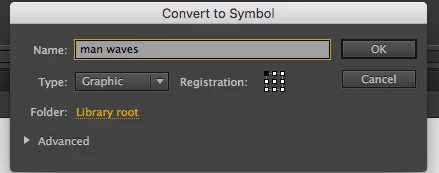
You will now see a new timeline and if you right click on frame 1 and select paste frames you will now have all the frames inside a symbol.
You can see that by looking just below the Timeline on the left You'll see Scene1 Man waves. that shows you're inside a symbol

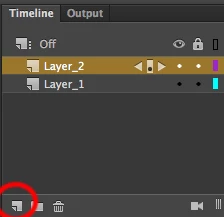
Click the scene 1 words and it will bring you out back to the main timeline. Create another layer by hitting the New Layer icon to the left of the timeline.
Now go to the Library, Windows/Library and you'll see the man waving symbol you created there. Grab it and drag it to the stage and now you'll have two men waving but the one you dragged is moveable. If you hit Q on your keyboard you can resize the man in the symbol to be larger or you can flop him or even move him across the screen. This is the power of using symbols. You have a timeline inside a timeline and you can alter that second man to do anything else. OR it can have a series of hands inside it, or a head that has different expressions. It's a complicated process but if you like you can watch some of my tutorials I did for Adobe and it goes in depth about this process.
Animating with Mike Milo - YouTube
They're kinda long so you may have to scrub through to find details and there's a whole LOT of them as well. Anyway I hope this helps a bit.
 AdChoices