


Participant
September 25, 2024
Answered

I need help with publishing an APK

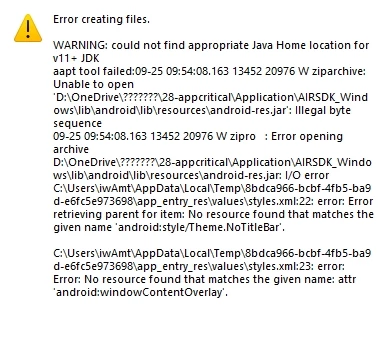
Hello friends, I need some help. I created an application using ActionScript 3.0, and I want to generate an .apk file. However, I’m unable to publish the apk, and I’m getting this error message as shown in the attached image. I believe I followed the same steps I usually do, but this time something went wrong. Why is this happening?

 

This topic is closed to new replies. Start a new post to keep the conversation going.
kglad
kgladCorrect answer
Community Expert
September 25, 2024

I tried changing the save location to drive D, but it's still the same.


copy and paste here your publish setting and your air for android panel (both general and deployment tabs).

14 replies

Participating Frequently
October 5, 2026

The error may be related to the Android SDK or the certificate/signing settings used when publishing the APK. Since the project was working before, I’d first check whether any SDK, AIR, or certificate settings changed. Rechecking the Android packaging settings and creating a fresh build with the correct certificate would also be worth trying.

Translate
Inspiring
September 17, 2026

I’d first check the Android SDK/SDK path and AIR or Animate version you’re using, since APK publishing errors can come from an outdated or misconfigured SDK. Also verify the application descriptor and signing certificate settings, then try a clean rebuild to rule out a project configuration issue.

Translate
artistic_adventurea4fb
Participant
September 7, 2026

It sounds like something may have changed in the publishing setup or SDK configuration. I’d double-check the AIR/Android settings and the exact error message, as that should help narrow down what’s preventing the APK from being generated.

Translate
ariahazel
Participant
May 2, 2026

did you fix your problem

Translate
Participant
May 1, 2026

what’s the update status bout your issue

Translate
Participant
September 23, 2025

Good advice here updating the SDK usually fixes those headaches. I had a similar issue before and it turned out to be the certificate setup, so definitely worth double checking that part too.

Translate
Lucia
Participant
March 25, 2025

Hey there, @ddreamna did you succeed in generating the .apk file?

Translate
kglad
Community Expert
Community Expert
September 25, 2024

don't save (directly) to a onedrive folder.

Translate
ddreamnaAuthor
Participant
September 25, 2024

I tried moving it to the screen, but it still didn’t work as before.

Translate