Jeffery.Wright
Inspiring
June 21, 2021
Answered

Import color palette? How?

  • June 21, 2021
  • 1 reply
  • 981 views

"You can import and export both solid and gradient color palettes between ..."
"To replace the current palette with the imported colors, select Replace Colors."  https://helpx.adobe.com/animate/using/color.html

No mention of how to import or export colors. 


So, how is this done?

Thanks. 



This topic has been closed for replies.
Correct answer n. tilcheff

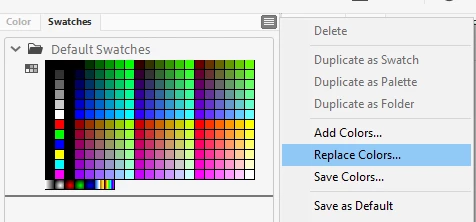
Exporting and importing is done via the hamburger button drop-down:


1 reply

n. tilcheff
n. tilcheffCorrect answer
Legend
June 21, 2021

Exporting and importing is done via the hamburger button drop-down:


Nick - Character Designer and Animator, Flash user since 1998 | Member of the Flanimate Power Tools team - extensions for character animation
Jeffery.Wright
Inspiring
July 22, 2021

Thanks for the info. 


Intuitively, one should be able to do that without hunting through submenus, like here for example:


"Replace Colors" is not very good UX design, as I simply want to Add A New Pallet, not replace any Colors. 

Thanks, again!