
Participant
August 28, 2017
Answered

Instalar Flash Professional

  • August 28, 2017
  • 1 reply
  • 599 views

Assino Creative Clound. Tenho vários trabalhos antigos formatados em ActionScript 2.0. Preciso editá-los em Flash Professional.

Houve um momento que foi possível instalar o Flash pela tela do Creative Clound como versão anterior de Animate.

Formatei meu computador e, agora, a opção de instalar versão anteriores não está disponível.

Preciso de orientação para instalar o Flash Professional.
    This topic has been closed for replies.
    Correct answer Colin Holgate

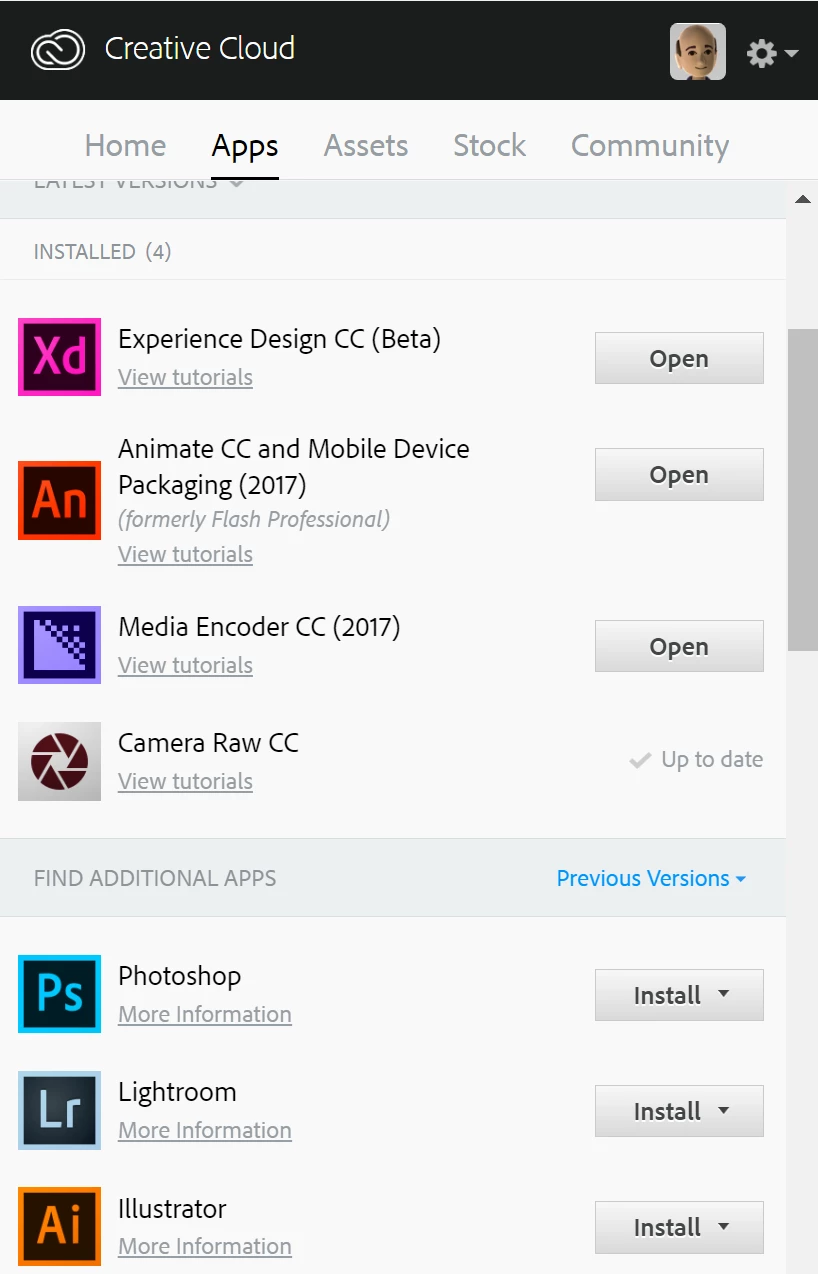
    I don't think this is the older version of the menu. Last week the menu in my computer had an option for install Other Versions. I had a problem with Windows and formatted the computer. When reinstalled the Adobe programs, the menu came without option Other Versions. The menu with down arrow has just option for uninstall. I don't find another menu on the right.


    The old menu doesn't have the down arrows, and the new one does. Have you scrolled down far enough to find the additional apps?

    Under Windows I'm still seeing the old menu.

    1 reply

    Colin Holgate
    Inspiring
    August 31, 2017

    The CC menu has changed recently. Go to the CC menu/App/Animate CC entry, and in the menu to the right (where it says "Open"), click the down arrow and you can choose "Other Versions". In the other versions list CS6 is at the bottom.

    Participant
    August 31, 2017

    The down arrow in this new CC menu hasn't option "Other Versions".

    Colin Holgate
    Inspiring
    August 31, 2017

    That may be the older version of the menu. If you scroll down do you see a Find Additional Apps section? If you do, can you select Previous Versions from the menu on the right?