Participant
Feb 2, 2020 4:58 AM UTC
Answered

Is it possible to change the FPS in Adobe Animate 2020?

So far everything looks very easy to control in this program-- but the FPS is stuck on 30. and I don't see any way to change it. I'd like to have the option of animating in 2's (12 fps) or using standard film frame-rate (24 fps)-- this must be an option right?

n. tilcheff
n. tilcheffCorrect answer
Legend
Feb 2, 2020 5:08 AM UTC

Hi mate,


There are at least two easy places, maybe more.


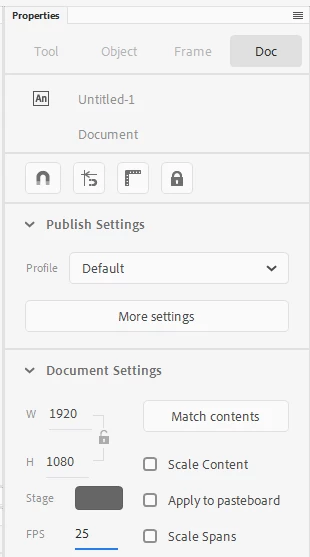
Properties Inspector - FPS at the bottom of this image:


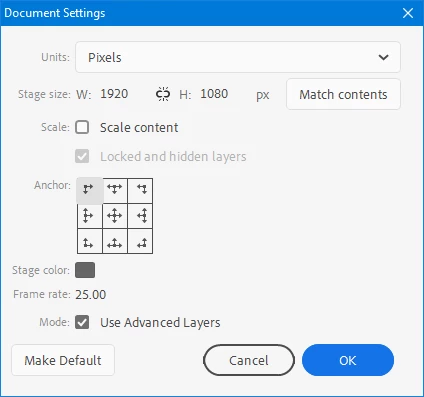
And Modify menu > Documents Settings...


Hope this helps!


Nick - Character Designer and Animator, Flash user since 1998 | Member of the Flanimate Power Tools team - extensions for character animation

4 replies

Participant
Feb 2, 2020 5:04 AM UTC

I just noticed the frame-rate changes with different presets-- but I'd still like to choose the frame rate. Specifically, I'd like to work in full HD at 12 fps. 

Translate
n. tilcheff
n. tilcheffCorrect answer
Legend
Feb 2, 2020 5:08 AM UTC

Hi mate,


There are at least two easy places, maybe more.


Properties Inspector - FPS at the bottom of this image:


And Modify menu > Documents Settings...


Hope this helps!


Translate
Nick - Character Designer and Animator, Flash user since 1998 | Member of the Flanimate Power Tools team - extensions for character animation
Participant
Feb 2, 2020 5:14 AM UTC

Beautiful-- thanks!

Translate