Inspiring
March 16, 2023
Answered

is it possible to change the same coloured symbols at once

  • March 16, 2023
  • 1 reply
  • 343 views

Hi!

When importing an ai file to adobe animate, the illustration has different symbols with the same color code. 


I manually change the into a different color. for example, the picture has red and I change them into purple because of the content of my project but it takes so much time to change them one by one.


I wonder if is there a shorter way to change the chosen vectors' color into a different single color.


Many thanks,


    This topic has been closed for replies.
    Correct answer JoãoCésar17023019

    Hi.


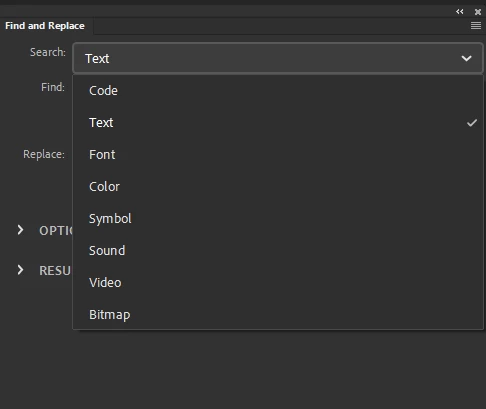
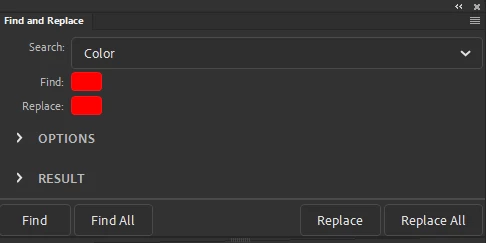
    Use the Find and Replace feature and choose Color from the Search dropdown menu.


    https://helpx.adobe.com/animate/using/find-replace.html


    Regards,

    JC

    1 reply

    JoãoCésar17023019
    Community Expert
    JoãoCésar17023019Community ExpertCorrect answer
    Community Expert
    March 16, 2023

    Hi.


    Use the Find and Replace feature and choose Color from the Search dropdown menu.


    https://helpx.adobe.com/animate/using/find-replace.html


    Regards,

    JC

    Inspiring
    March 16, 2023

    Wow, I did and it worked! That was really quick thank you very much!


    Many thanks!

    G

    JoãoCésar17023019
    Community Expert
    Community Expert
    March 16, 2023

    You're welcome!