
commoniq_49504929
Participating Frequently
January 2, 2019
Answered

Is it possible to create a Quick Time Event game?

  • January 2, 2019
  • 5 replies
  • 834 views

The title pretty much says it.

I am trying to make a Quick Time Event system in which the player has to press a certain key to move on. I already know it is possible with a mouse.

If possible, how can you let a key command in actions to only work in an individual scene? I have recently discovered when you press on an assigned key (E) correctly, it would go to the next but pressing or holding on the same key while it's on a different scene will cycle through the scenes. When I assign (F) to the next attack, both E and F would cycle through them. This leaves me to believe that the code I copied somewhere didn't have a command to stop it when it reaches the next scene. Extra notes - "a next scene command" was not added, it's just a go-to command assigned to the last frame of the scene. If you like, add something better besides gotoAndPlay(98);

Using the same Character is also a problem because for some reason it goes back to the layer I first assigned to.

My intention is

I want only a single key to work for each scene, is there a way to stop the script once the duration of the scene was reached? I also want the keys to be reusable later on.

Oh yeah, and also I want the assigned key to be no longer pressable when my animated timer runs out.

Thanks: by an inexperienced scripter

Please, give me your suggestions.

Scene 1

stage.addEventListener(KeyboardEvent.KEY_DOWN, KeyPressed);

function KeyPressed(evt:KeyboardEvent):void {

    if (evt.keyCode==Keyboard.E){

       gotoAndPlay(98);

    }

}

Scene 2

stage.addEventListener(KeyboardEvent.KEY_DOWN, KeyPress);

function KeyPress(evt:KeyboardEvent):void {

    if (evt.keyCode==Keyboard.F){

       gotoAndPlay(71);

    }

}

Image Problem Example
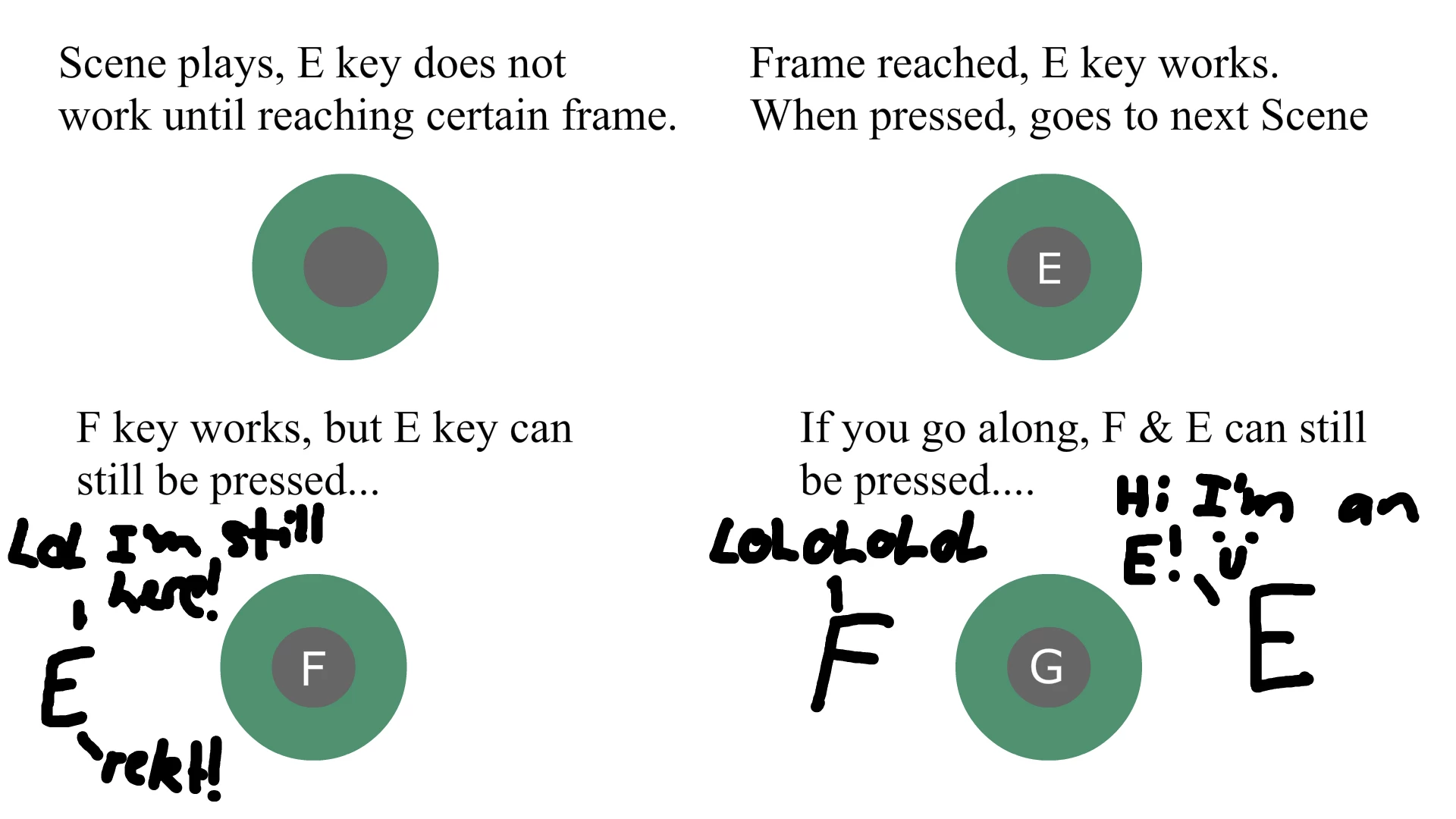
no seriously...

This topic is closed to new replies. Start a new post to keep the conversation going.
Correct answer JoãoCésar17023019

Hi.

You don't need to add an event listener to the stage in each scene. Just add one in the beginning and create some conditionals. Like this:

import flash.events.KeyboardEvent;

import flash.ui.Keyboard;

function keyDownHandler(e:KeyboardEvent):void

{

     if (currentScene.name == "Scene 1")

     {

          if (e.keyCode == Keyboard.E)

               nextScene();

     }

     else if (currentScene.name == "Scene 2")

     {

          if (e.keyCode == Keyboard.F)

               nextScene();

     }

     else if (currentScene.name == "Scene 3")

     {

          if (e.keyCode == Keyboard.G)

               nextScene();

     }

}

stop();

if (!stage.hasEventListener(KeyboardEvent.KEY_DOWN))

     stage.addEventListener(KeyboardEvent.KEY_DOWN, keyDownHandler);

I hope this helps.

Regards,

JC

5 replies

commoniq_49504929
Participating Frequently
January 2, 2019

Wow, THANK YOU!!

Didn't expect a quick reply, but you certainly delivered!

I have been searching for the answer everywhere but can't seem to find the answer.

thanks again, have a nice day!

Happy New Year bud :)

JoãoCésar17023019
Community Expert
Community Expert
January 3, 2019

Excellent! You're welcome!

JoãoCésar17023019
Community Expert
JoãoCésar17023019Community ExpertCorrect answer
Community Expert
January 2, 2019

Hi.

You don't need to add an event listener to the stage in each scene. Just add one in the beginning and create some conditionals. Like this:

import flash.events.KeyboardEvent;

import flash.ui.Keyboard;

function keyDownHandler(e:KeyboardEvent):void

{

     if (currentScene.name == "Scene 1")

     {

          if (e.keyCode == Keyboard.E)

               nextScene();

     }

     else if (currentScene.name == "Scene 2")

     {

          if (e.keyCode == Keyboard.F)

               nextScene();

     }

     else if (currentScene.name == "Scene 3")

     {

          if (e.keyCode == Keyboard.G)

               nextScene();

     }

}

stop();

if (!stage.hasEventListener(KeyboardEvent.KEY_DOWN))

     stage.addEventListener(KeyboardEvent.KEY_DOWN, keyDownHandler);

I hope this helps.

Regards,

JC

commoniq_49504929
Participating Frequently
January 2, 2019

Wow, THANK YOU!!

Didn't expect a quick reply, but you certainly delivered!

I have been searching for the answer everywhere but can't seem to find the answer.

thanks again, have a nice day!

Happy New Year bud

Legend
January 2, 2019

So your actual question is: "Is it possible to remove keyboard event listeners?"

Yes. Yes it is.

EventDispatcher - Adobe ActionScript® 3 (AS3 ) API Reference