

Is it possible to manipulate fla files before they are published to swf using ActionScript? It's like how the After Effects script works.
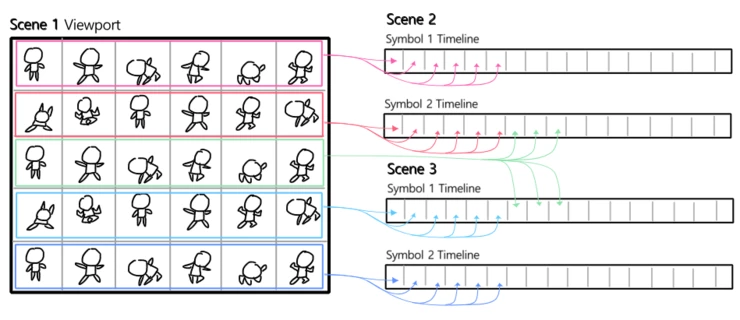
During the production of animations, the schedule is so urgent that we have to carry out both character design and animation at the same time.
So, I tried to visualize the function as above to quickly respond to the retake.
Please review your ability to implement this functionality with ActionScript.
Below, I have outlined some specific methods and procedures for implementing this idea.
------------------------------
1. In Illustrator cc, the image of the sprite sheet in which the pose of the character is arranged at regular intervals is made into a vector and is loaded into Scene 1 of the animated cc.
2. Use ActionScript to determine the screen coordinates of Scene1 and specify the areas of the rectangle surrounding each character pose image.
3. In the above image, since the table is formed in 6x5 format, 30 areas will be specified in total and can be used like a two-dimensional array.
4. The vector character pose in each area is sent to the address specified in ActionScript (specific frames of symbols in different scenes).
5. Now on this state, Animators will use frame picker to animate.
6. If we don't have ActionScript, we have created an animation, but when we do a design retake, we need to copy, paste, and adjust the position of the each character pose sources one by one in order to update the sources again. There are dozens and hundreds of scenes and poses to update.
7. However, if we can do this with ActionScript, we will be able to quickly respond to design retakes that occur after the animation is complete.
------------------------------
I don't have any programming experience yet, but if i see the possibility of creating these features myself, then I think it will be a motivation for studying ActionScript in the future.
Thank you.


 AdChoices