


Participant
Apr 27, 2024 4:26 PM UTC
Answered

Is there a way to change the stroke or the line design in flash 8
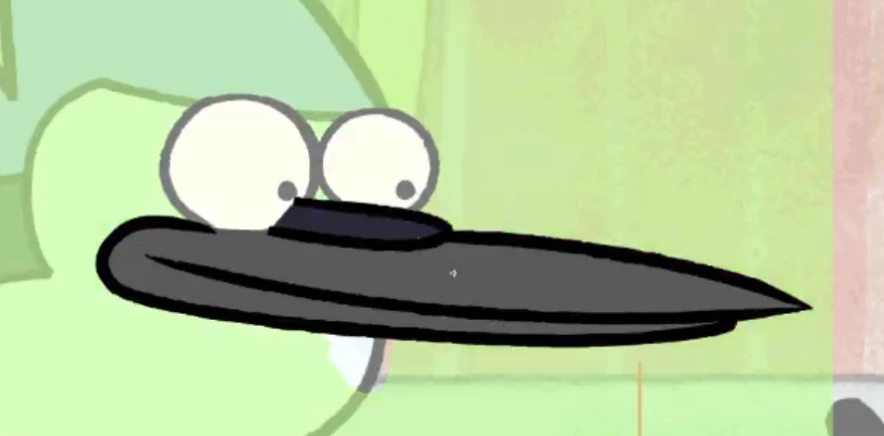
Is there a way to change the line design so it looks like this? its not smooth it has the funny design to it. idk how to say it. and i wanted to ask if there is a way to import like custom strokes to flash 8. To the line tool

This topic is closed to new replies. Start a new post to keep the conversation going.
n. tilcheff
n. tilcheffCorrect answer
Legend
Apr 27, 2024 9:12 PM UTC

No.

The only thing you can do to approximate this look in Flash 8 is to remove all smoothing and use the pencil tool to hand draw the lines, then convert lines to fills to adjust further. 

You can make them 'boil' by using the smoothing/optimize tool.

It will be fiddly to do and result in hundreds of vector points, which will negatively affect performance.


Nick - Character Designer and Animator, Flash user since 1998 | Member of the Flanimate Power Tools team - extensions for character animation

2 replies

n. tilcheff
n. tilcheffCorrect answer
Legend
Apr 27, 2024 9:12 PM UTC

No.

The only thing you can do to approximate this look in Flash 8 is to remove all smoothing and use the pencil tool to hand draw the lines, then convert lines to fills to adjust further. 

You can make them 'boil' by using the smoothing/optimize tool.

It will be fiddly to do and result in hundreds of vector points, which will negatively affect performance.


Translate
Nick - Character Designer and Animator, Flash user since 1998 | Member of the Flanimate Power Tools team - extensions for character animation
Participant
Apr 28, 2024 1:05 PM UTC

Hey could you show me how to do it with pictures? becuase i kinda dont understand. and it would really help me since i am making an animation and i wonder how i can make the funny texture

Translate