Inspiring
Mar 9, 2018 10:48 PM UTC
Answered

Is there a way to make Animate automatically do that ? (like a macro)

I'm making animations with Adobe Animate and importing layers from Photoshop.

Sometimes I've got like 34 or 40 layers and I have to manually do that :

Capturer 04 - Streamable

Is there a way to make Animate automatically do that ? (putting each layer after the previous one ?)

Thank you for your help

    This topic is closed to new replies. Start a new post to keep the conversation going.
    JoãoCésar17023019
    JoãoCésar17023019Correct answer
    Community Expert
    Mar 10, 2018 9:08 AM UTC

    Hi.


    Here is a script that does what you need.


    Probably k will give you a most efficient way of doing this, but, for now, I think it can help you.


    Feel free to improve it in any way desired.


    UPDATE (03/23/2023):

    I didn't review the code. Just grabbed it from another folder I have in Google Drive.

    var defaultValue = "3";
    var space = prompt("Type the pyramid edge width.", defaultValue);
    var doc = fl.getDocumentDOM();
    var timeline = fl.getDocumentDOM().getTimeline();
    var selectedLayers = timeline.getSelectedLayers();
    var count;
    var increment;
    
    function start()
    {
    	if (!doc || !selectedLayers || selectedLayers.length == 1 || space == null)
    		return;
    	else
    	{
    		space = space.replace(/\s/g,'');
    		
    		if (isNaN(parseFloat(space)) || space <= 0)
    			return;
    		else
    			count = Number(space);
    		
    		increment = count;
    	}
    	
    	for (var i = selectedLayers.length - 1; i >= 0; i--)
    	{	
    		timeline.setSelectedLayers(selectedLayers[i], true);		
    		timeline.insertFrames(count, false, 0);		
    		timeline.insertKeyframe(count - (increment - 1));
    		count += increment;
    	}
    }
    
    start();

    -----------------------------------------------------------------------------------------------------------------------


    JSFL download: layers_pyramid.jsfl - Google Drive


    Usage:

    Select the layers you want, type in the value of the pyramid's edges or leave the default and press 'OK'.


    Code (for reference):

    var defaultValue = "3";

    var space = prompt("Type the pyramid edge width.", defaultValue);

    var doc = fl.getDocumentDOM();

    var timeline = fl.getDocumentDOM().getTimeline();

    var selectedLayers = timeline.getSelectedLayers();

    var count;

    var increment;


    function start()

    {

        if (!doc || !selectedLayers || selectedLayers.length == 1 || space == null)

            return;

        else

        {

            space = space.replace(/\s/g,'');


            if (isNaN(parseFloat(space)) || space <= 0)

                return;

            else

                count = Number(space);


            increment = count;

        }


        for (var i = selectedLayers.length - 1; i >= 0; i--)

        {   

            timeline.setSelectedLayers(selectedLayers, true);       

            timeline.insertFrames(count, false, 0);       

            timeline.insertKeyframe(count - (increment - 1));

            count += increment;

        }   

    }


    start();


    Demonstration:
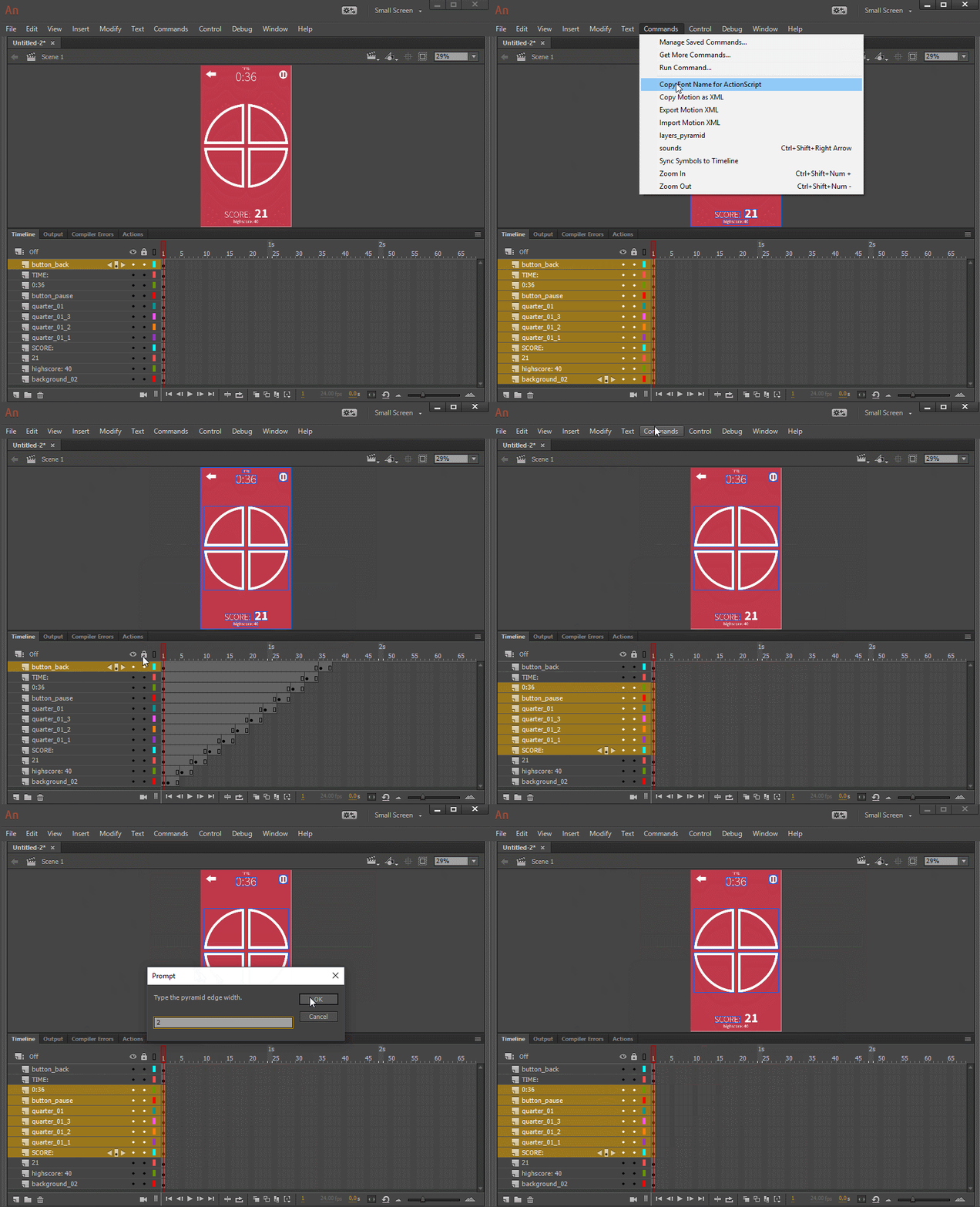
     

    I hope it helps.


    Regards,

    JC

    16 replies

    JoãoCésar17023019
    Community Expert
    JoãoCésar17023019Community ExpertCorrect answer
    Community Expert
    Mar 10, 2018 9:08 AM UTC

    Hi.


    Here is a script that does what you need.


    Probably k will give you a most efficient way of doing this, but, for now, I think it can help you.


    Feel free to improve it in any way desired.


    UPDATE (03/23/2023):

    I didn't review the code. Just grabbed it from another folder I have in Google Drive.

    var defaultValue = "3";
    var space = prompt("Type the pyramid edge width.", defaultValue);
    var doc = fl.getDocumentDOM();
    var timeline = fl.getDocumentDOM().getTimeline();
    var selectedLayers = timeline.getSelectedLayers();
    var count;
    var increment;
    
    function start()
    {
    	if (!doc || !selectedLayers || selectedLayers.length == 1 || space == null)
    		return;
    	else
    	{
    		space = space.replace(/\s/g,'');
    		
    		if (isNaN(parseFloat(space)) || space <= 0)
    			return;
    		else
    			count = Number(space);
    		
    		increment = count;
    	}
    	
    	for (var i = selectedLayers.length - 1; i >= 0; i--)
    	{	
    		timeline.setSelectedLayers(selectedLayers[i], true);		
    		timeline.insertFrames(count, false, 0);		
    		timeline.insertKeyframe(count - (increment - 1));
    		count += increment;
    	}
    }
    
    start();

    -----------------------------------------------------------------------------------------------------------------------


    JSFL download: layers_pyramid.jsfl - Google Drive


    Usage:

    Select the layers you want, type in the value of the pyramid's edges or leave the default and press 'OK'.


    Code (for reference):

    var defaultValue = "3";

    var space = prompt("Type the pyramid edge width.", defaultValue);

    var doc = fl.getDocumentDOM();

    var timeline = fl.getDocumentDOM().getTimeline();

    var selectedLayers = timeline.getSelectedLayers();

    var count;

    var increment;


    function start()

    {

        if (!doc || !selectedLayers || selectedLayers.length == 1 || space == null)

            return;

        else

        {

            space = space.replace(/\s/g,'');


            if (isNaN(parseFloat(space)) || space <= 0)

                return;

            else

                count = Number(space);


            increment = count;

        }


        for (var i = selectedLayers.length - 1; i >= 0; i--)

        {   

            timeline.setSelectedLayers(selectedLayers, true);       

            timeline.insertFrames(count, false, 0);       

            timeline.insertKeyframe(count - (increment - 1));

            count += increment;

        }   

    }


    start();


    Demonstration:


    I hope it helps.


    Regards,

    JC

    Translate
    Inspiring
    Mar 10, 2018 9:20 AM UTC

    Super thanks for this answer and the code! Unfortunately, I've just tested it but it doesn't seems to work (nothing is happening) :

    Capturer 01 - Streamable

    Translate
    JoãoCésar17023019
    Community Expert
    Community Expert
    Mar 10, 2018 9:25 AM UTC

    Great!

    You have to select the layers first.

    Sorry, because I edited my comment and you probably didn't see the update.

    Translate
    kglad
    Community Expert
    Community Expert
    Mar 9, 2018 11:24 PM UTC

    yes.  you can use jsfl to automate that task.

    Translate
    Inspiring
    Mar 9, 2018 11:32 PM UTC

    Ok.. Do you have any tutorial how to do that ?

    Translate
    kglad
    Community Expert
    Community Expert
    Mar 9, 2018 11:55 PM UTC

    i haven't made a tutorial but you could search for one using google:  jsfl tutorial

    Translate