
Known Participant
April 20, 2022
Answered

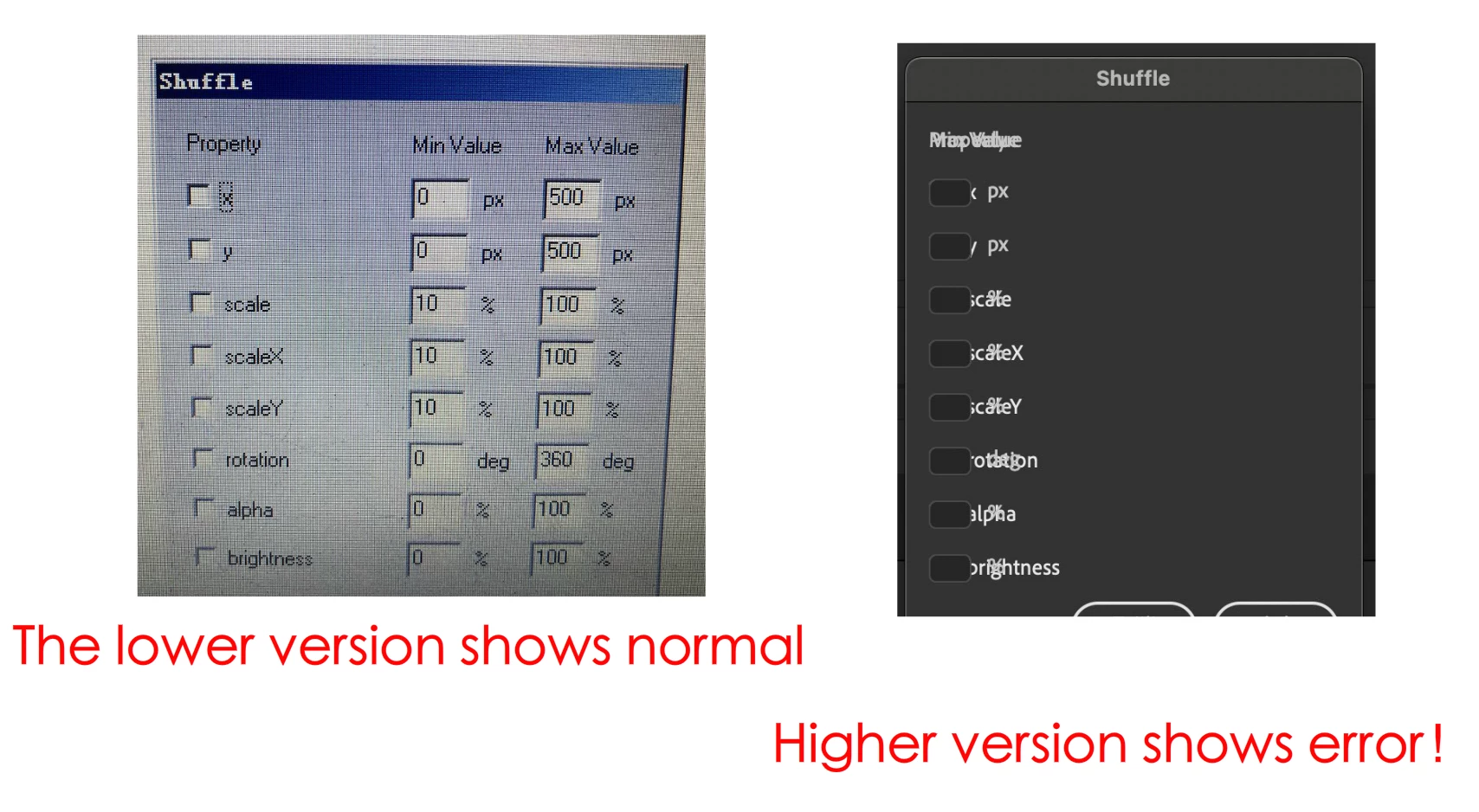
Is this a grammatical error problem?
  • April 20, 2022
  • 3 replies
  • 1014 views

<?xml version="1.0"?>
<dialog title="Shuffle" buttons="accept,cancel" >
<grid>
	<columns>
		<column/>
		<column/>
		<column/>
	<columns/>
	<rows>
		<row>
			<label value="Property" />
			<label value="Min Value       " />
			<label value="Max Value" />
		</row>
		<row>
			<checkbox id="ch_x" label="x" checked="false" />
			<hbox>
				<textbox id="x_min" value="0" size="4" />
				<label value="px" />
			</hbox>
			<hbox>
				<textbox id="x_max" value="500" size="4" />
				<label value="px" />
			</hbox>
		</row>
		<row>
			<checkbox id="ch_y" label="y" checked="false" />
			<hbox>
				<textbox id="y_min" value="0" size="4" />
				<label value="px" />
			</hbox>
			<hbox>
				<textbox id="y_max" value="500" size="4" />
				<label value="px" />
			</hbox>
		</row>
		<row>
			<checkbox id="ch_s" label="scale" checked="false" />
			<hbox>
				<textbox id="s_min" value="10" size="4" />
				<label value="%" />
			</hbox>
			<hbox>
				<textbox id="s_max" value="100" size="4" />
				<label value="%" />
			</hbox>
		</row>
		<row>
			<checkbox id="ch_xs" label="scaleX" checked="false" />
			<hbox>
				<textbox id="xs_min" value="10" size="4" />
				<label value="%" />
			</hbox>
			<hbox>
				<textbox id="xs_max" value="100" size="4" />
				<label value="%" />
			</hbox>
		</row>
		<row>
			<checkbox id="ch_ys" label="scaleY" checked="false" />
			<hbox>
				<textbox id="ys_min" value="10" size="4" />
				<label value="%" />
			</hbox>
			<hbox>
				<textbox id="ys_max" value="100" size="4" />
				<label value="%" />
			</hbox>
		</row>
		<row>
			<checkbox id="ch_rt" label="rotation" checked="false" />
			<hbox>
				<textbox id="rt_min" value="0" size="4" />
				<label value="deg" />
			</hbox>
			<hbox>
				<textbox id="rt_max" value="360" size="4" />
				<label value="deg" />
			</hbox>
		</row>
		<row>
			<checkbox id="ch_al" label="alpha" checked="false" />
			<hbox>
				<textbox id="al_min" value="0" size="4" />
				<label value="%" />
			</hbox>
			<hbox>
				<textbox id="al_max" value="100" size="4" />
				<label value="%" />
			</hbox>
		</row>
		<row>
			<checkbox id="ch_br" label="brightness" checked="false" />
			<hbox>
				<textbox id="br_min" value="0" size="4" />
				<label value="%" />
			</hbox>
			<hbox>
				<textbox id="br_max" value="100" size="4" />
				<label value="%" />
			</hbox>
		</row>
	<rows>
</grid>
</dialog>
This topic has been closed for replies.
Correct answer Vladin M. Mitov

Is it win10 system? mine is appleM1


As a general advice, I would suggest to avoid the usage of "size" attribute on the textboxes. If you want to fit the textboxes in your layout restricting their sizes, you can use "width" attribute, defined in pixels.


But I notice one more issue: For me (Win10, AA 22.0.5) the first checkbox ("x") in the dialogue is not clickable. I've seen this behavior before and I think it's a bug introduced in Animate 22.


3 replies

kqskcmAuthor
Known Participant
April 20, 2022

JSFL has sent,Hope someone can clear my confusion

var dom = fl.getDocumentDOM();
var sel = dom.selection;

if(sel.length > 0) {
	var interfaceInfo = dom.xmlPanel(fl.configURI + 'Commands/Shuffle.xml');
	if(interfaceInfo.dismiss == "accept"){
		for( i=0; i<sel.length; i++) {
			dom.selectNone();
			var item = sel[i];
			dom.selection = [item];
			if(dom.selection.length > 0) {
				var tp = dom.getTransformationPoint();
				// temporarily set the transformation point to 0,0
				dom.setTransformationPoint({x:0, y:0});
				if(interfaceInfo.ch_x == "true") {
					dom.moveSelectionBy({x:getRandom(parseInt(interfaceInfo.x_min), parseInt(interfaceInfo.x_max))-item.left, y:0});
				}
				if(interfaceInfo.ch_y == "true") {
					dom.moveSelectionBy({x:0, y:getRandom(parseInt(interfaceInfo.x_min), parseInt(interfaceInfo.x_max))-item.top});
				}
				// restore the oringinal
				dom.setTransformationPoint({x:tp.x, y:tp.y});
				if(interfaceInfo.ch_s == "true") {
					var temp_s = getRandom(parseInt(interfaceInfo.s_min), parseInt(interfaceInfo.s_max))/100;
					dom.scaleSelection(temp_s, temp_s);
				} else {
					if(interfaceInfo.ch_xs == "true") {
						dom.scaleSelection(getRandom(parseInt(interfaceInfo.xs_min), parseInt(interfaceInfo.xs_max))/100, 1);
					}
					if(interfaceInfo.ch_ys == "true") {
						dom.scaleSelection(1, getRandom(parseInt(interfaceInfo.ys_min), parseInt(interfaceInfo.ys_max))/100);
					}
				}
				if(interfaceInfo.ch_rt == "true") {
					dom.rotateSelection(getRandom(parseInt(interfaceInfo.rt_min), parseInt(interfaceInfo.rt_max)));
				}
				if(item.elementType == "instance") {
					if(interfaceInfo.ch_al == "true") {
						dom.setInstanceAlpha(getRandom(parseInt(interfaceInfo.al_min), parseInt(interfaceInfo.al_max)));
					}
					if(interfaceInfo.ch_br == "true") {
						dom.setInstanceBrightness(getRandom(parseInt(interfaceInfo.br_min), parseInt(interfaceInfo.br_max)));
					}
				}
			}
		}
		if((interfaceInfo.ch_al == "true") && (interfaceInfo.ch_br == "true")) {
			fl.trace("Shuffle : Only one extra effect can be applied to the instance , \"_alpha\" is ignored.");
		}
	}
} else {
	alert("Shuffle : Nothing to operate on.");
}
dom.selection = sel;
function getRandom(a, b) {
	return (a+Math.floor(Math.random()*(b-a+1)));
}


Vladin M. Mitov
Inspiring
April 21, 2022

There were two syntax errors - тhe 'columns' and the 'rows' tags were not closed correctly. Here is the corrected version:


<?xml version="1.0" encoding="UTF-8"?>
<dialog title="Shuffle" buttons="accept,cancel">
   <grid>
      <columns>
         <column />
         <column />
         <column />
      </columns>
      <rows>
         <row>
            <label value="Property" />
            <label value="Min Value       " />
            <label value="Max Value" />
         </row>
         <row>
            <checkbox id="ch_x" label="x" checked="false" />
            <hbox>
               <textbox id="x_min" value="0" size="4" />
               <label value="px" />
            </hbox>
            <hbox>
               <textbox id="x_max" value="500" size="4" />
               <label value="px" />
            </hbox>
         </row>
         <row>
            <checkbox id="ch_y" label="y" checked="false" />
            <hbox>
               <textbox id="y_min" value="0" size="4" />
               <label value="px" />
            </hbox>
            <hbox>
               <textbox id="y_max" value="500" size="4" />
               <label value="px" />
            </hbox>
         </row>
         <row>
            <checkbox id="ch_s" label="scale" checked="false" />
            <hbox>
               <textbox id="s_min" value="10" size="4" />
               <label value="%" />
            </hbox>
            <hbox>
               <textbox id="s_max" value="100" size="4" />
               <label value="%" />
            </hbox>
         </row>
         <row>
            <checkbox id="ch_xs" label="scaleX" checked="false" />
            <hbox>
               <textbox id="xs_min" value="10" size="4" />
               <label value="%" />
            </hbox>
            <hbox>
               <textbox id="xs_max" value="100" size="4" />
               <label value="%" />
            </hbox>
         </row>
         <row>
            <checkbox id="ch_ys" label="scaleY" checked="false" />
            <hbox>
               <textbox id="ys_min" value="10" size="4" />
               <label value="%" />
            </hbox>
            <hbox>
               <textbox id="ys_max" value="100" size="4" />
               <label value="%" />
            </hbox>
         </row>
         <row>
            <checkbox id="ch_rt" label="rotation" checked="false" />
            <hbox>
               <textbox id="rt_min" value="0" size="4" />
               <label value="deg" />
            </hbox>
            <hbox>
               <textbox id="rt_max" value="360" size="4" />
               <label value="deg" />
            </hbox>
         </row>
         <row>
            <checkbox id="ch_al" label="alpha" checked="false" />
            <hbox>
               <textbox id="al_min" value="0" size="4" />
               <label value="%" />
            </hbox>
            <hbox>
               <textbox id="al_max" value="100" size="4" />
               <label value="%" />
            </hbox>
         </row>
         <row>
            <checkbox id="ch_br" label="brightness" checked="false" />
            <hbox>
               <textbox id="br_min" value="0" size="4" />
               <label value="%" />
            </hbox>
            <hbox>
               <textbox id="br_max" value="100" size="4" />
               <label value="%" />
            </hbox>
         </row>
      </rows>
   </grid>
</dialog>


- Vlad: UX and graphic design, Flash user since 1998Member of Flanimate Power Tools team - extensions for character animation
kqskcmAuthor
Known Participant
April 22, 2022

Thanks a lot, but there is a problem,The numbers are out of sight here。

JoãoCésar17023019
Community Expert
Community Expert
April 20, 2022

I was able to render your window but I'm also getting the result of the second image. My Animate version is 22.0.5. I'm not sure why this is happening. I just know that a user complained some time ago about differences of display between older and newer versions. I'll let you know if I find the topic.


Anyway, try contacting the team because it may be some bug introduced in newer versions.


Regards,

JC

kglad
Community Expert
Community Expert
April 20, 2022

xml can't be displayed so there's no way to determine (with what you've shown) what you're doing with the xml to arrive at any kind of display.


ie, there's a programming language that's used to load the xml file, parse the xml file and then add something to the (browser?) display.

JoãoCésar17023019
Community Expert
Community Expert
April 20, 2022

Custom dialog boxes can be displayed using JSFL and the XMLUI API.

kglad
Community Expert
Community Expert
April 20, 2022

this is as3?