Known Participant
January 23, 2013
Answered

Is this - Locale.stringIDArray - an Array or an Object?

  • January 23, 2013
  • 2 replies
  • 2238 views

public static loadStringEx(stringID: String, languageCode: String) : String

This is the loadStringEX declaration, and it would seem to indicate that it's a multidimensional array? that is, the Locale.stringIDArray. (Or it's an object)

var arr:Array = Locale.stringIDArray;

for (var i=0; i<arr.length; i++) {

                                        IDLabel = Locale.loadStringEx(Locale.stringIDArray, loc)

                                        ID = Locale.stringIDArray;                               

                              trace("ID :" + ID + " is " + IDLabel);

                              trace("Array ID:"+ Locale.stringIDArray + ":" + IDLabel);

                              }

and this returns

ID :IDS_008 is 复位

Array ID:IDS_008:复位

ID :IDS_010 is 目前的地理定位数据\n

Array ID:IDS_010:目前的地理定位数据\n

ID :IDS_015 is 水平精度

I am thinking of extracting this data, easy enough in this instance, and putting it into an SQLite database. That way I can recall it anytime anywhere to use in various parts of the program.

I can't find anyone doing Locale work and the examples in the Adobe help are just too basic. The ID and the Label have to be available to me from anywhere in the program.
This topic has been closed for replies.
Correct answer sinious

Hi there.

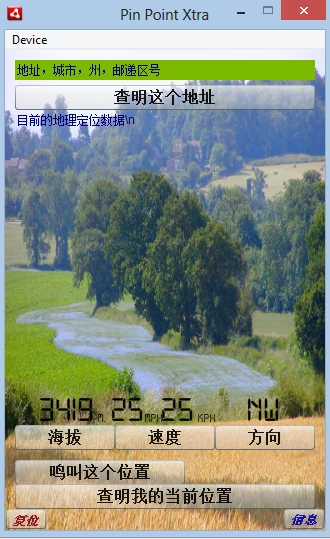
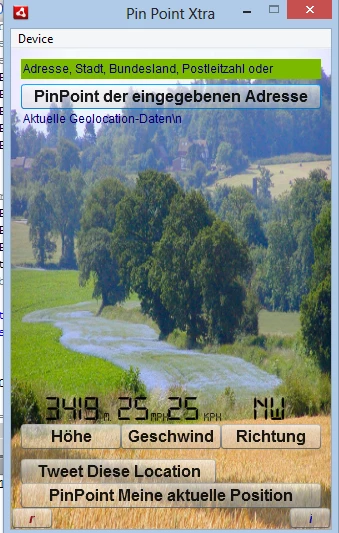
Thanks, that got me going in the right direction, and along with just about everythhing I've studied this last week and a half ... I think I have a working model. Pretty much anyway.

The result:

These are only screen shots of course, but it is working the way I want it.

I had to change your suggestion slightly, to this

ClearWebView.label = Locale.loadString("IDS_018");

and build the whole callback thing around it - I'll keep working on it, as it's a bit clunky as it is, but hey it works ...


   private function createClearWebViewButton():void

        {

  var ClearWebViewFormat:TextFormat = new TextFormat("Verdana",12);

  ClearWebViewFormat.color = 0x254117;

  ClearWebViewFormat.bold = true;

  ClearWebViewFormat.italic = true;

    ClearWebView = new Button();

  ClearWebView.width = stage.stageWidth - 188;

  ClearWebView.height = 20;

  ClearWebView.x = 100;

  ClearWebView.y = stage.stageHeight - 21;

  ClearWebView.alpha = 0.9;

  //ClearWebView.label = "Close Window";

  Locale.setLoadCallback(Callback);

  Locale.addXMLPath(loc, loc + "/PinPointPremium_" + loc + ".xml");

  Locale.loadLanguageXML(loc);

  function Callback(success:Boolean):void {

  ClearWebView.label = Locale.loadString("IDS_018");

  }

  ClearWebView.setStyle("textFormat", ClearWebViewFormat);

  ClearWebView.addEventListener(MouseEvent.CLICK, handleClearWebViewButton);

  addChild(ClearWebView); 

  }

In other parts of the program, I can actually load a lot of the labels at once, as I did originally. I have also switched back to the Strings option of "using ActionScript Control".

This is the set of text label controls from just inside the main function (Constructor position) that does most of the labels, so I only have to run the other bit in about 4 or 5 places just to get some bits in that don't get seen until other user actions.

This bit also allows me to set the language I'm testing in, so I can make everything fit.

loc = Capabilities.language;

                              //trace("The default language: " + loc);

                              // for testing purposes, set it to what language you want

                              loc = "de";

                              //trace("The new language: " + loc);

                              // load the language files

                               Locale.addXMLPath(loc, loc + "/PinPointPremium_" + loc + ".xml");

                               Locale.loadLanguageXML(loc);


                        Locale.setLoadCallback(localeCallback);

                              Locale.addXMLPath(loc, loc + "/PinPointPremium_" + loc + ".xml");

                              Locale.loadLanguageXML(loc);


                               var arr:Array = Locale.stringIDArray;


           function localeCallback(success:Boolean):void {

                                        //{

                                        //for (var i=0; i<arr.length; i++)

                                        //IDLabel = Locale.loadStringEx(Locale.stringIDArray, loc)

                                        //ID = Locale.stringIDArray;

                                        //}

                                          //trace(IDs.describe());

                                        //btnAddress.label = "PinPoint the Entered Address"

                                        btnAddress.label = Locale.loadString("IDS_001");

                                        //tiAddress.text = "Address, City, State, Zip or Latitude,Longitude";

                                        tiAddress.text = Locale.loadString("IDS_002");

                                        //btnInfo1.label = "Altitude";

                                        btnInfo1.label = Locale.loadString("IDS_003");

                                        // btnInfo2.label = "Speed";

                                        btnInfo2.label = Locale.loadString("IDS_004");

                                        // btnDirection.label = "Direction";

                                        btnDirection.label = Locale.loadString("IDS_005");

                                        //btnTwitterUserNP.label = "Tweet This Location";

                                        btnTwitterUserNP.label = Locale.loadString("IDS_006");

                                        //btnGPS.label = "PinPoint My Current Location";

                                        btnGPS.label = Locale.loadString("IDS_007");

                                        //btnReset.label = "r";

                                        btnReset.label = Locale.loadString("IDS_008");

                                        //btnInfo.label = "i";

                                        btnInfo.label = Locale.loadString("IDS_009");

                                        //tfInfo.text = "Current Geolocation Data:\n";

                                        tfInfo.text = Locale.loadString("IDS_010");


                                        //ClearWebView.label = "Close Window";

                                        //ClearWebView.label = Locale.loadString("IDS_018");

                                        //IDLabel = Locale.loadString("IDS_018");


                                        }

But however - many thanks for your patience and your help. It is most appreciated, and even where I was beginning to think I was as thick as a plank.... I kept at it. So its almost working.... thanks again.


You're welcome and if you're all set please mark a correct answer to mark the thread answered so we can filter unanswered questions. Keep at it and good luck!

2 replies

sinious
Legend
January 23, 2013

OP is asking what loadStringEx is, not stringIDArray which self-describes itself.

The documentation does not mention how the loadStringEx() static method holds data. It could be an Object, Dictionary or Array. In any case a string comparison is needed so the lookup will be slow regardless what it is if there's a ton of strings converted to multiple languages.

I don't feel a SQLLite DB will perform any better with a string based query either but may be easier to manage complex joins of multiple languages and other things the Locale class does not do by default.

Inspiring
January 23, 2013

For some reason you must really hate the API Reference:

http://help.adobe.com/en_US/FlashPlatform/reference/actionscript/3/fl/lang/Locale.html#stringIDArray

What has it done to you to deserve this cruel fate?

Known Participant
January 23, 2013

well, yes. Been strugglling with this for a week now. I will have to look at other options. SQL may work, as there are only 24 strings to store. Well, with SQL maybe more, because that will also allow me to store whole paragraphs as well. could be handy.

Anyway, the program is 1660 lines long so far and growing. and that's just the main class.

The only way I can get someting into this btnAddress.label is from WITHIN the 'function localeCallback(success:Boolean):void {  ....'

btnAddress.label = Locale.loadString("IDS_001");

  }

}

whence it has just loaded the xml file. As in the sample in that AS3 Flash page.

I can list the IDS_xxx and the strings that go with them - but ONLY from within that localeCallBack function.

I'm beginning to think I'm the only person stupid enough to try Localeizing their project. There are lots of similar examples out there, just copies of the AS3 ones. I can find no working projects that use Locale. Maybe someone else can.

Do I hate it? No, of course not. I love trying to solve the problems - so much so that I'm awefully tempted to switch to XCode. Good old C.

sinious
Legend
January 23, 2013

c would be an upgrade, I vehemently hate objective-c. The sheer verbosity and back in the day the triple requirement (between .h/.c) to declare/synthesize variables, ugh what an outdated mess. (NULL, NIL? Sometimes used in the same method? ....).

Anyhow I do TONS of localizations. They usually don't co-exist in the same project. When they do I use embedded TTFs in SWCs via Flash Builder while using XML for the actual data and haven't had any issue since then.

I think we already had this conversation but overall the Strings panel never saved me time, just gave me obstacles, so I always used my own well formed XML data file for ease.