



agneti
Participating Frequently
November 4, 2020
Answered

Issue: Capital letters in spritsheets name

  • November 4, 2020
  • 2 replies
  • 759 views

Hi,
When I export Image assets as Spritesheet, the outcoming file contains always Capital letters, ex: risk_intro_aar_pr_atlas_NP_1.jpg The same filename you can find several places in the following js file.
The problem is that my customer does not want files containing Capital letters on his server.
If I rename the file name to ***_atlas_np_1.jpg my animation will not play since the js file calls the ***_atlas_NP.

Is this a way to get rid of those capital letters once for all? I work with e-learning and the courses I work with contain many js and atlas - files. I can not go through all my files, both jpg, and js, and change all the capital letters every time I publish my files ...

    This topic has been closed for replies.
    Correct answer kglad

    that was helpful.


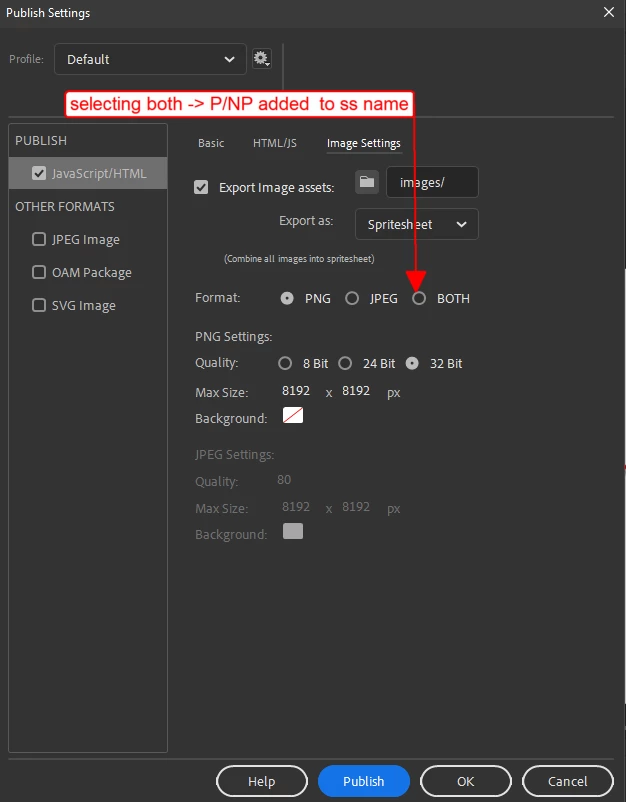
    you're publishing both an jpg and png spreedsheet and that causes the additional P/NP (to the png/jpg, resp) spreedsheet names.


    to remedy, untick the option to publish both, file>publish settings>image settings>format


    p.s. i have no idea why animate does that.  maybe to make it obvious which is Png and Not Png?

    2 replies

    kglad
    Community Expert
    kgladCommunity ExpertCorrect answer
    Community Expert
    November 5, 2020

    that was helpful.


    you're publishing both an jpg and png spreedsheet and that causes the additional P/NP (to the png/jpg, resp) spreedsheet names.


    to remedy, untick the option to publish both, file>publish settings>image settings>format


    p.s. i have no idea why animate does that.  maybe to make it obvious which is Png and Not Png?

    agneti
    agnetiAuthor
    Participating Frequently
    November 5, 2020

    Thank you very much.
    Actually, I've had the same thought and tested it. I've got the **atlas_1.jpg (or png). 
    I wonder what to do if I have both formats (and I have those in some cases)? Why capital letters, Adobe? Why?

    kglad
    Community Expert
    Community Expert
    November 12, 2020

    if you want to publish both, publish twice; once with the png setting and once with the jpg setting.


    but if you want to use both with one published js file, you would need to do some editing.

    kglad
    Community Expert
    Community Expert
    November 4, 2020

    i never see that.


    first, if i right click a library item>click generate spritesheet i can control the file name and location.


    second, if i set my publish settings to export images as a spritesheet, the spritesheet is named the same as the fla with _atlas_1 appended.


    so how are you generating a spritesheet?

    agneti
    agnetiAuthor
    Participating Frequently
    November 5, 2020

    Please, take a look at the attached picture. I mean there is nothing wrong with the names of files or graphics/photos. I don't know why/where this NP (or P if the sprite sheetcontains png) comes from.
    If I know what NP/P stands for, maybe I could find a solution.
    Thank you very much for your time 🙂